The case for AI in employee assistance
The advent of generative AI tools and agents has been a game changer for the modern workplace at Microsoft. And one of the foremost examples of how we’re reaping the benefits of this agentic revolution is our deployment of our new Employee Self-Service Agent across the company.
Thanks to the power of AI, agents, and Microsoft 365 Copilot, our employees—and workers everywhere—are discovering new ways to be more productive at their jobs every day. Recent research shows that knowledge workers are increasingly seeing big gains from using AI tools for work tasks. According to our Microsoft Work Trend Index:
75%
of knowledge workers reported that they use AI at work today.
90%
shared that AI helps them save time.
85%
said AI helps them focus more on their work.
84%
reported that AI helps them be more creative.
As an AI-first Frontier Firm, Microsoft is at the leading edge of a transformation that’s bringing this technology into all aspects of our workplace operations. With tools like Microsoft 365 Copilot providing “intelligence on tap,” we’re forging a human-led, AI-operated work culture that enables our employees to accomplish more than ever before.
Bringing AI to employee assistance
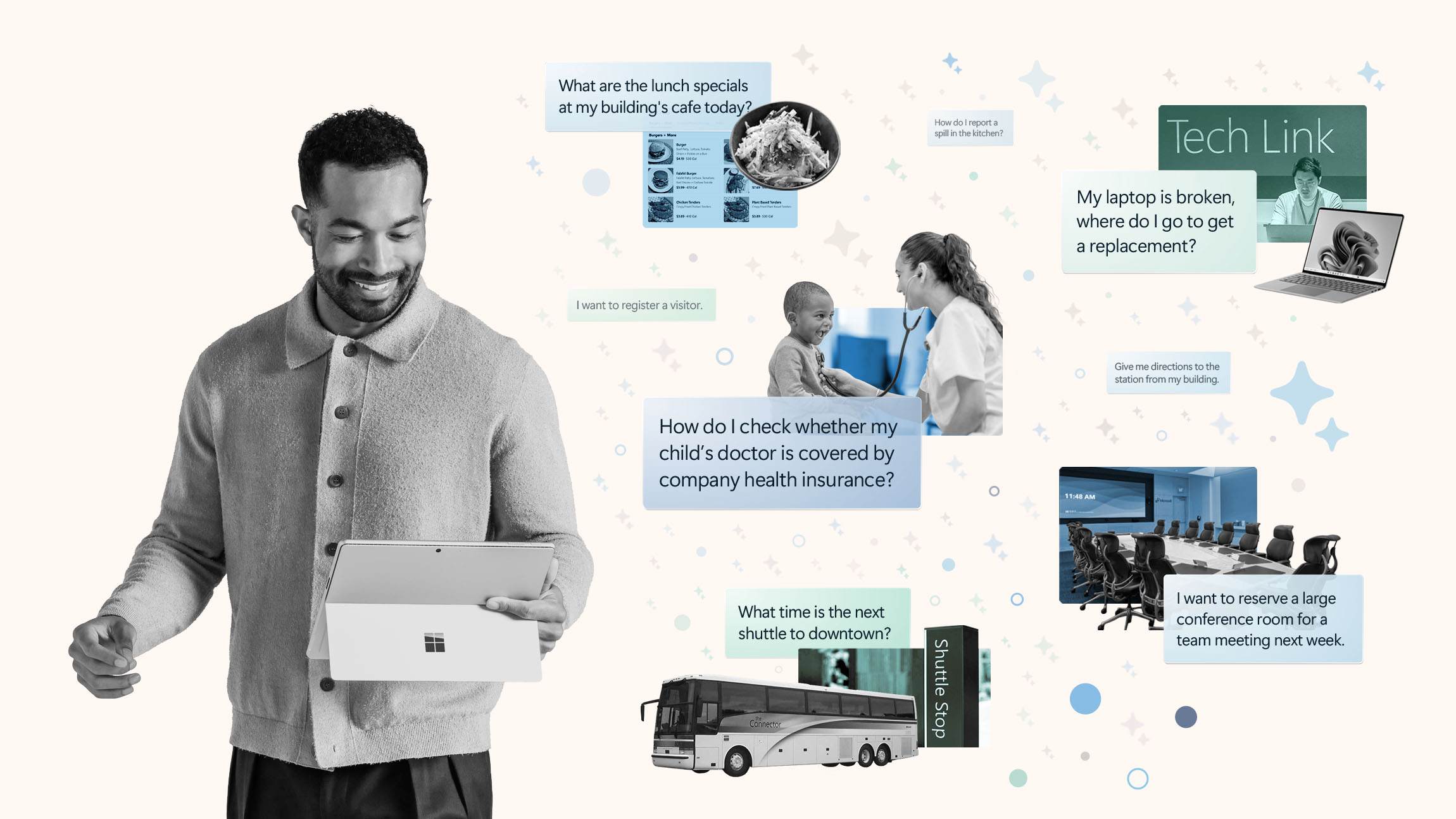
As part of this move to embed AI across our enterprise, it was a natural step for us to apply this burgeoning technology to a common pain point for us and many workplaces today—employee assistance.
Workers in organizations large and small face many common issues in their day-to-day jobs. Whether it’s a problem with their device, a question about their benefits, or a facilities request, our typical employee was often forced to navigate a bewildering array of tools, apps, and systems in order to get help with each specific task.
This confusion is reflected in research showing that most workers are dissatisfied with existing employee-service solutions.
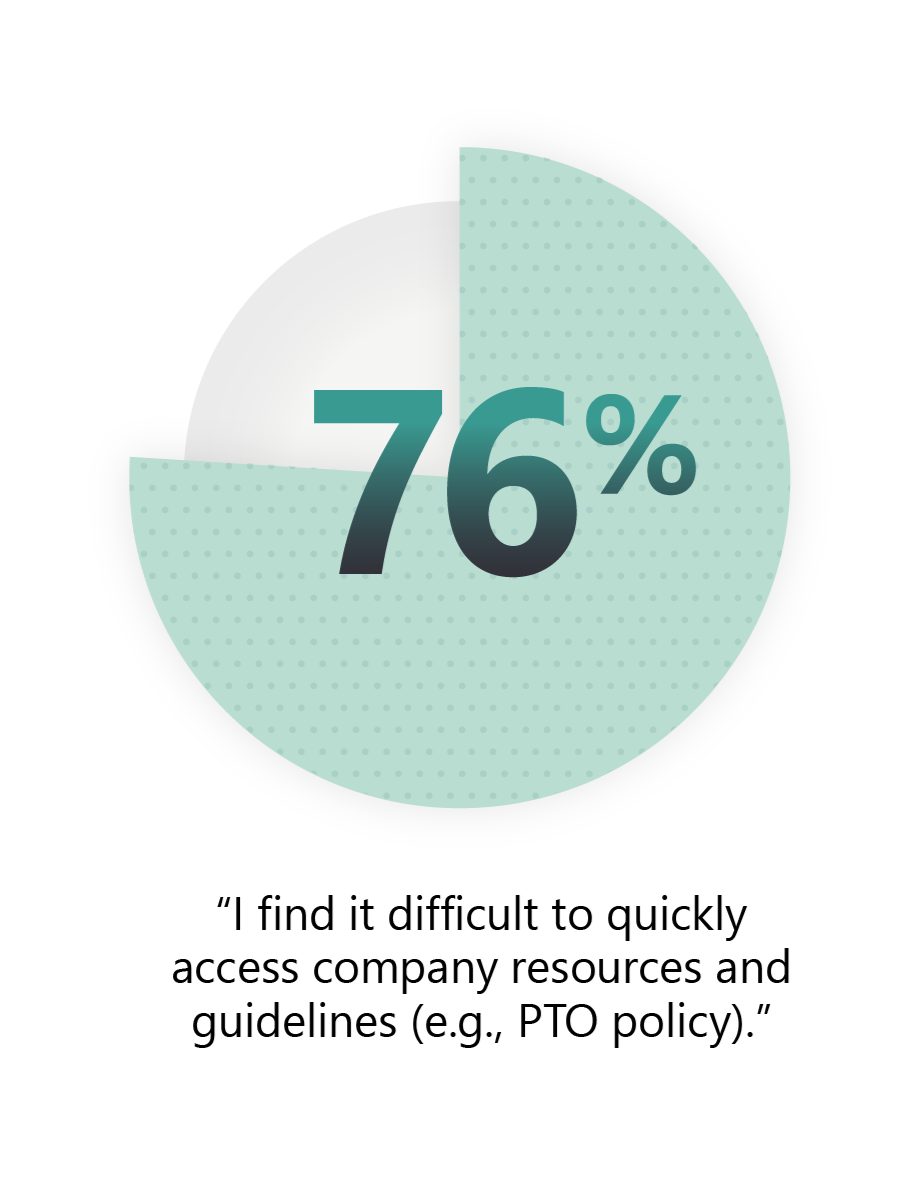
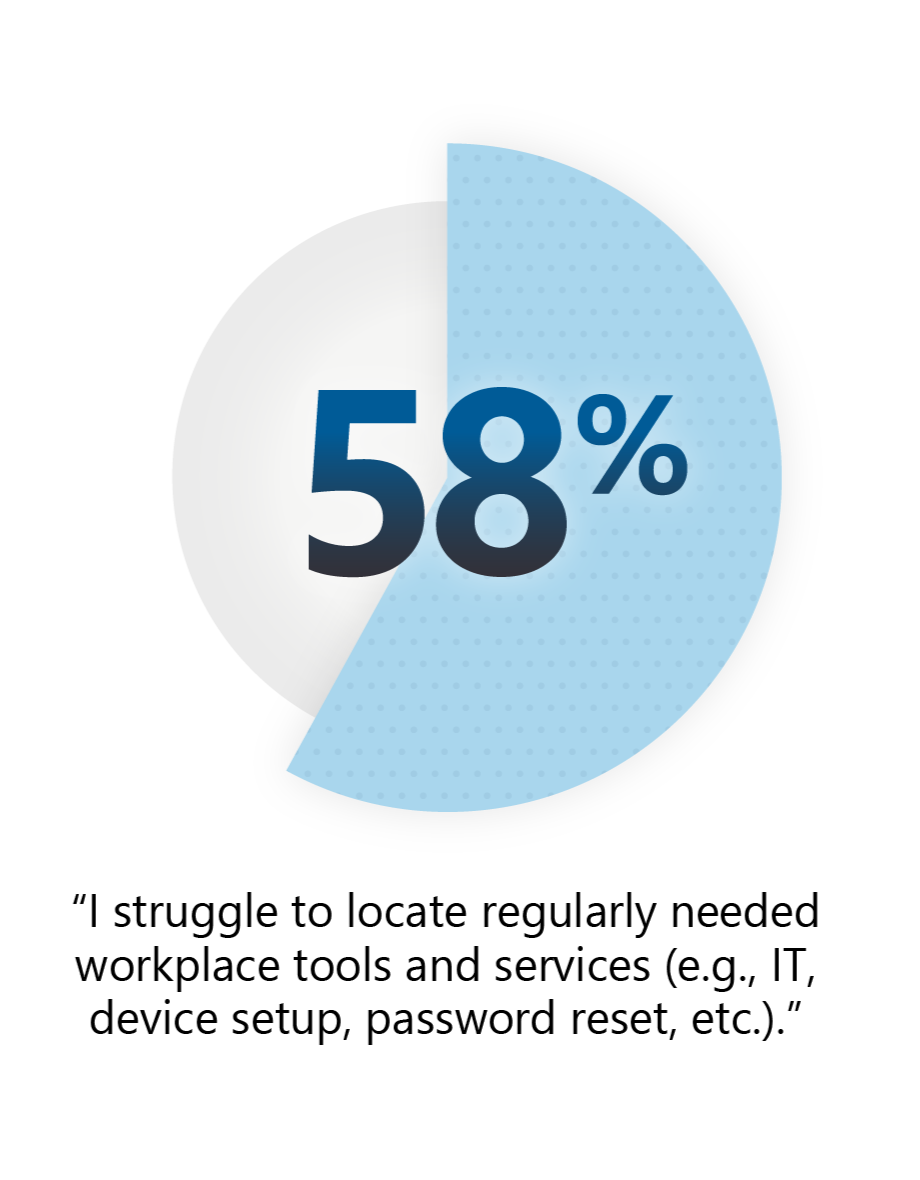
Our studies show that most employees have trouble finding the appropriate tools and resources they need to address their workplace-related questions.
Realizing that this was an ideal opportunity for AI, we set out to develop a state-of-the-art agentic solution. At Microsoft Digital, the company’s IT organization, we partnered with our product groups to develop and deploy the Employee Self-Service Agent, a “single pane of glass” that employees can turn to any time they need help. The product is now broadly available in general release.

“With this employee self-service solution, we’re shaping a new era in worker support. With AI, every interaction is intuitive, every resource is within reach, and help feels seamless—creating an experience that empowers our people and accelerates business outcomes.”
Nathalie D’Hers, corporate vice president, Microsoft Employee Experience
Because Copilot is our “UI for AI,” the Employee Self-Service Agent is delivered as an agent in Microsoft 365 Copilot. If your employees have access to Copilot, you can deploy the agent at your company at no extra cost. If your employees don’t have a Copilot license, they can access it via Copilot Chat if it’s enabled by your IT administrator.
For the initial development and launch of our Employee Self-Service Agent, we decided to provide agentic help in three categories: Human resources, IT support, and campus services (real estate and facilities). Every organization will have to make its own determination for which functions to include in their implementation. Note that the agent is inherently flexible and expandable; we plan to add additional capabilities, such as finance and legal, in the future.
We learned many lessons in the almost year-long process of developing and implementing the Employee Self-Service Agent across our organization worldwide. The goal of this guide is to pass on what we learned—including how we used it to provide value to our employees and vendors—to help you prepare for, implement, and drive adoption of your own version of the agent.
“With this employee self-service solution, we’re shaping a new era in worker support,” says Nathalie D’Hers, corporate vice president of Microsoft Employee Experience. “With AI, every interaction is intuitive, every resource is within reach, and help feels seamless—creating an experience that empowers our people and accelerates business outcomes.”
Before you start: Developing your plan
As you embark on your Employee Self-Service Agent journey, make sure to establish a clear and structured plan. This was a critical step for us in our deployment, and we can say with confidence that it will help you avoid surprises and increase your chances of a successful outcome.
Based on our experience here at Microsoft, the below is a high-level outline of the steps you should consider as you prepare for deploying your agent.
1. Define prerequisites
Start by making sure that all foundational elements for the agent are in place.
- Assign licenses to your employees who will interact with the agent. They will need Microsoft 365 Copilot or Copilot Chat.
- Verify readiness by configuring your Power Platform environments, applying Data Loss Prevention (DLP) policies, and setting up isolation (limited and controlled deployment with guardrails in place) where needed.
- Ensure connectivity with critical systems by confirming that you have appropriate APIs and connectors available and functioning for the essential workplace systems that your organization uses (e.g., Workday, SAP SuccessFactors, and ServiceNow).
2. Identify your core team and responsibilities
Successful implementation of the Employee Self-Service Agent requires collaboration across multiple roles and departments in your organization.
- Business owners from the areas your agent will cover—such as human resources and IT support—can help you define requirements, priorities, success criteria, and telemetry needs.
- Platform administrators, particularly for Power Platform and tenant/identity teams, can manage your technical configuration.
- Content owners and editors are needed to identify the knowledge sources to surface in the agent, curate new knowledge sources, and maintain the data underpinning these sources on an ongoing basis.
- Subject matter experts can provide important “golden” prompt and user scenarios that the agent should prioritize and answer accurately.
- Compliance, privacy, and security leaders and their teams are needed to address risk considerations.
- Support professionals can help build a structure for live agent escalation and ticketing operations (in situations where the agent is unable to provide a solution).
- Focus groups of end users assist with validating requirements and scenarios, as well as help with testing the agent.
3. Establish a clear timeline
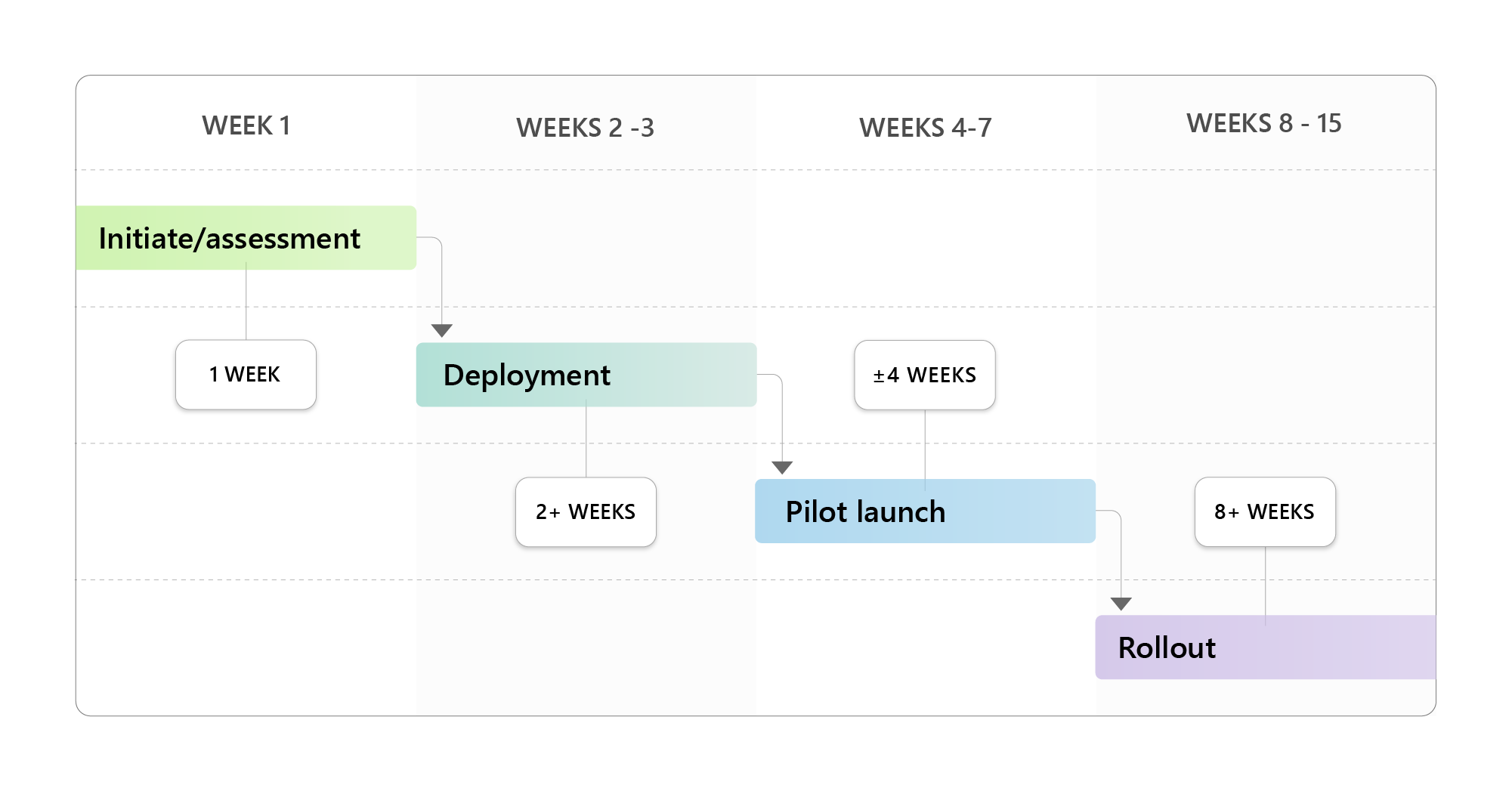
We found that creating a schedule for the creation, implementation, and adoption of the agent is crucial. This phased approach will help you maintain momentum and accountability over the duration of the project.
For example, here’s a rough implementation timeline that you might use to gauge your progress:
4. Articulate your vision
Communicate your rollout plan to your team, including timelines and phases, and adjust it based on feedback. Establish clear goals and meaningful success metrics to guide you and make sure your efforts are in alignment with your company objectives. (Note: You may want to consider key upcoming projects or events in your organization and link the agent roadmap to them. This will help you meet your project’s success criteria faster and encourage quicker agent adoption.)
5. Define your governance
This phase will allow you to define policies and standards and conduct a thorough content audit to ensure accuracy, relevance, security, and sustainability.
6. Implement your agent
This phase involves configuration and integration, followed by testing.
7. Roll out the agent while driving adoption and measurement
We advise deploying the Employee Self-Service Agent using a phased, or ringed, approach. We started with a small group of employees, then gradually rolled it out to larger and larger groups before finally releasing it to our entire organization.
We encouraged adoption with internal targeted communications and promotional efforts. Careful measurement enabled us to track impact and optimize agent performance. This type of concerted change management allowed us to share the latest product developments with our employees and to keep them excited and engaged with the tool.
By investing sufficient time and effort in the planning phase of your deployment, you’ll create a strong foundation for a secure, scalable, and successful self-service agent experience.
Chapter 1: Governance means getting your data right
When a Microsoft employee enters a query into an AI chat tool like Microsoft 365 Copilot, they know that they may not receive an individualized response that is directly specific to their situation. They are aware that they might need to verify the answer they receive with further research and additional sources.
But when it comes to our company-endorsed self-service agent, the stakes are different. Our employees expect to receive accurate and personally relevant responses when they ask for help. This is particularly true for queries related to important personal details, like HR-related questions about leave policies or benefits.

“People expect personally tailored and highly accurate answers, especially for HR moments that really matter. We designed the Employee Self‑Service Agent with that expectation in mind, pairing trusted data and deep personalization with strong governance controls so that privacy, security, and trust are built into every interaction.”
Prerna Ajmera, general manager, HR digital strategy and innovation
Although the Employee Self-Service Agent comes pretrained with basic HR and IT support data, we found that the quality of the responses that our employees receive is directly connected to the accuracy, currency, and depth of the information we provide to the tool. You’ll want to spend the necessary time and effort to make sure that your data governance process is well thought-out and thorough, so that your employees experience the best possible results.
“Employee self‑service has a higher bar than generic AI tools,” says Prerna Ajmera, general manager of HR strategy and innovation. “People expect personally tailored and highly accurate answers, especially for HR moments that really matter. We designed the Employee Self‑Service Agent with that expectation in mind, pairing trusted data and deep personalization with strong governance controls so that privacy, security, and trust are built into every interaction.”
Major considerations for governance
We learned that before you configure your agent, you need to establish guardrails that protect your data’s integrity and that build your employees’ trust. These considerations will form the backbone of your governance framework:
- Managing requirements: Define what the agent must deliver and align your stakeholders on clear, prioritized goals and objectives.
- Determining and managing resources: Ensure you have the right people, systems, and funding in place to support your full product lifecycle.
- Data security: Protect your sensitive employee information with strong controls, compliant storage, and least‑privilege access.
- User access: Establish who can use, administer, and update your agent, with appropriate permissions and guardrails.
- Change tracking: Monitor your updates to content, configurations, and workflows so your agent always reflects your current policies.
- Reviewing: Regularly evaluate your content’s accuracy, the agent’s performance, and your organizational fitness to help you keep your employees’ experience with the agent trustworthy.
- Auditing: Maintain traceability for compliance, incident investigation, and quality assurance across all of your data flows.
- Deployment control: Manage where, when, and how you roll out new versions of the agent to reduce disruption and ensure consistency.
- Rollback: Prepare a fast, safe path to reverting your changes if something breaks.
We found that addressing these considerations early in the process creates a governance structure that is proactive rather than reactive, increasing the quality of responses and setting your organization up for success.
Architecture essentials
Understanding the architecture of our agent helped our governance teams make informed decisions about our configuration and integration. To do that, they needed to review and understand its key architectural components. You’ll need to do the same.
Here’s a list of the different architecture components that our team assessed, to help you get started on your own process:
- Topics: Structured intents (e.g., “view paystub”) that align to employee questions and drive consistent answers.
- Domain packages: Pre-curated bundles for different agent segments (like HR and IT support) that provide reusable patterns, prompts, and integrations.
- Knowledge sources: Documents, intranet pages, FAQs, and databases that ground responses in authoritative content.
- Connectors: Secure integrations to systems of record (like Workday or SAP SuccessFactors) can help enable read/write operations. (Because the Employee Self-Service Agent was built with Copilot Studio, it has access to more than 1,400 different connectors.)
- Instructions: Governance-approved rules and prompts that shape tone, guardrails, and escalation behavior.
Assessing and preparing your content
A key early governance step is to audit all relevant content in your knowledge bases. This process should include assessing, updating, and, if necessary, restructuring this information before it is ingested by the agent.
An important caveat here is that the agent’s ability to understand which policies and procedures apply to which employee relies on your content having consistent metadata, permissions, and content structure. We found that before feeding your data into the agent, you need to:
- Inventory existing content: Your content will incorporate many different types, such as SharePoint pages, Microsoft Teams posts, PDFs, intranet articles, and knowledge-base documents. The goal of the inventory process is to identify content that is complete rather than outdated, duplicative, or siloed; if there are issues with the content, they should be addressed before loading into the agent.
- Assign knowledge owners: The owners should be SMEs who can help validate, tag, and maintain the content going forward. Part of this process is training up knowledge owners to be able to prepare and maintain content in ways that make it easily consumable by both agents and people.
- Structure content for discoverability: All your content needs to have accurate metadata, well-defined topic pages, and consistent naming so that the agent can surface the right information at the right time.
We found that completing a thorough content audit helps us ensure that the Employee Self-Service Agent isn’t just chatting—it’s delivering trusted, up-to-date answers that save your workers time and effort as they go about their day.
Be aware of tone and conversational flow
Providing vetted and well-structured data to the agent is important, but it’s not the entire battle. You’ll also need to make sure your agent is given clear guidance on conversational tone and instructions on what to do in specific scenarios.
Make sure you incorporate:
- Global instructions: Define the agent’s voice, behavior, and escalation rules to ensure consistency and trust.
- Topic-level triggers: Map natural language phrases to specific workflows (such as “reset password” or “check PTO”) so the agent routes these common queries correctly.
- Advanced knowledge rules: Prioritize which data sources to use in ambiguous scenarios, and define when the agent should ask clarifying questions.
Taking these steps gave our agent a better chance of being accurate, helpful, and aligned with our organization’s specific preferences.
Addressing common scenarios with “golden” content
Another vital aspect of your content audit is identifying the most frequently accessed information in each topic area.
A good example comes from the preparation of our IT support content for ingestion by the Employee Self-Service Agent. One of the focuses of this effort was on so-called “golden prompts:” the 20 or so topics that generate up to 80 percent of our employee queries (a version of the famous “80/20 rule”).
Our golden prompts are a curated set of scenarios that:
- Represent our critical user workflows and edge cases
- Possess clear, expected responses (golden responses)
- Cover core functionality that must never break
We made sure that the agent was providing high-quality responses for these common scenarios—we recommend you do the same.
Including “zero prompt” content
Another important aspect of your content process should be to develop “zero prompts.” These are preconfigured prompts in the agent that the user can simply click on to get an answer for a common issue or request.
For example, if one of your employees wants to understand how to set up a VPN, they simply click on the zero prompt provided for that topic. The tool then gives them complete instructions on how to set one up.
During our deployment of the agent, one case where we prepopulated the tool with content for a specific, high-demand scenario came when Microsoft made a major announcement regarding employees returning to the office. We knew this policy change would generate a lot of questions from our employees.
In preparation for this, we asked Microsoft 365 Copilot to create a single document that pulled in all the “return to office” material found in its verified HR content database. We then made this document available to the agent. Just by taking that simple step, we saw our user satisfaction ratings in the tool jump from 85 percent to 98 percent for that issue!
In your own deployment, think about what issues and topics generate the most questions from your employees. You can then prepare specific content to address these scenarios, which will increase your chances of success with the agent.
Data security and compliance
Data security was a high priority when we developed our agent, especially because it must necessarily access sensitive HR information on a regular basis. During product development, we made sure that the agent adhered to enterprise-grade security standards, including identity federation, least-privilege access, and encrypted storage.
Because the agent is built on Copilot Studio, it supports robust data-loss prevention features. The agent also complies with regulatory frameworks like General Data Protection Regulation through built-in auditing and data-retention policies.
One of the big advantages that an AI agent has over a static website or similar data source is the ability to personalize responses for each user. At the same time, we had to make sure that the agent had guardrails in place to avoid overexposing sensitive information. This included detailed disclaimers to help call out these kinds of responses and flag them for more careful handling.
Our agent complies fully with our accessibility standards as well. Like all Microsoft products and services, the tool underwent a rigorous review to ensure it was fully accessible for all users.
Responsible AI
Whenever a new AI application is launched, there may be concerns raised about potential challenges regarding bias, safety, and transparency. That’s why the Employee Self-Service Agent follows the Microsoft Responsible AI principles by default.
When you enable the sensitivity topic in your agent, it screens all responses for harassment, abuse, discrimination, unethical behavior, and other sensitive areas. We tested the agent thoroughly for objectionable responses before it was launched to a broad internal audience at Microsoft.
In addition, the agent includes an emotional intelligence (EQ) option. This feature is designed to make responses more empathetic, context-aware, and relevant for diverse user audiences. It analyzes the conversation’s context and tailors the agent’s replies to ensure that users feel understood and valued throughout their session (which could be particularly relevant for any conversations related to sensitive HR topics, such as family leave). The EQ option is customizable and can be turned off by your product admins.

Key takeaways
The following are important considerations for data governance when you deploy your Employee Self-Service Agent:
- Employee expectations regarding accuracy and relevance are high for employee self-service tools, which makes data governance a key aspect of your deployment.
- Consider which data repositories are best to incorporate into your agent, and make sure they are up-to-date and well-structured. This process requires a thorough content audit.
- Pay special attention to the so-called “golden prompts” that make up a large percentage of expected queries. The agent’s answers to these questions should be top-notch.
- Restructuring content can improve response quality. When we anticipated huge interest in a particular topic, such as workplace policy changes, we restructured our content on that subject and saw a significant jump in user satisfaction.
- Build your agent to meet or exceed high standards for data security, privacy, and Responsible AI. These are vital concerns for any product that has access to sensitive personal information.

Learn more
How we did it at Microsoft
- Learn how we’re getting the most out of agents internally here at Microsoft with good governance. This story shares what our Microsoft Digital governance team learned while deploying AI-driven tools here at Microsoft.
- Find out how we’re unlocking enterprise AI extensibility internally with Microsoft Copilot Studio. This post explains how we’re empowering our employees to create and extend Copilot-based agents using Copilot Studio.
- Read about how we’re infusing responsible AI principles into all our AI tools and projects at Microsoft. An article that explores the Microsoft Responsible AI Standard and how it informs our work with AI technologies at Microsoft Digital.
Further guidance for you
- Explore Microsoft Learn documentation for Microsoft Copilot Studio to read about key concepts in governance and security.
- Examine Microsoft Learn content related to security and data protection in Power Platform.
- Conduct the Microsoft 365 Copilot Optimization Assessment to understand your level of AI adoption and chart your course.
- Access Microsoft Learn documentation for Microsoft 365 Copilot to learn about data, privacy, security, and Zero Trust principles.
Chapter 2: Implementation with intention
Deploying a powerful and versatile tool like the Employee Self-Service Agent is no simple task. It requires guidance and buy-in from top leaders at the company, as well as detailed planning and execution across disparate parts of your organization. Here, we identify some of the key steps that we took here at Microsoft that can help guide you when launching your own self-service agent.
Determine category parameters
One of the first major decisions around implementing the agent is deciding which business function—we call them agent starters—to choose for your initial implementation.
We recommend starting with HR support or IT help (we started with HR). Both agent starters can be deployed into a single Employee Self-Service Agent experience, but they must be deployed one at a time.
So you know, we’ve built the Employee Self-Service Agent to be connectable with other first- or third-party Copilot agents, enabling a seamless handoff to these agents without having to navigate to other tools or interfaces.
Understanding your deployment steps
There were four essential stages involved in the deployment of our agent, each with multiple steps. Here’s a quick rundown that you can use at your company:
- Preparation for deployment
- Establish roles: Define who will manage, configure, and support the tool, assigning responsibilities to ensure accountability during deployment.
- Set up your environment: Prepare the necessary hardware, operating system, and network configurations so the agent can run smoothly.
- Set up third-party system integration: Ensure your infrastructure can securely connect and exchange data with external systems that the agent will need to integrate with.
- Installation
- Install the agent: Deploy the core Employee Self-Service Agent software on the designated servers or endpoints.
- Install accelerator packages: Add any desired connectors that enable the agent to communicate with commonly used systems for HR, payroll, IT support, etc.
- Customization
- Configure the core agent: Adjust default settings to align with your organization’s policies and workflows.
- Identify knowledge sources: Specify where the agent will pull information from, such as internal knowledge bases or FAQs.
- Provide common questions and responses: Add employee FAQs to improve the agent’s ability to respond quickly and accurately.
- Identify sensitive queries: Flag questions and responses that involve confidential or regulated information to ensure they’ll be handled securely.
- Publication
- Approve the agent: Complete internal reviews and compliance checks to confirm the agent meets your organizational standards before full rollout.
- Publish the agent: Make the configured agent available to your employees in your production environment.
Customization
The Employee Self-Service Agent operates as a custom agent within Copilot Studio, using our AI infrastructure via the Power Platform. The agent is constructed on a modular architecture that allows you to integrate it with your own enterprise data sources using APIs, prebuilt and custom connectors, and secure authentication mechanisms.
To streamline this integration process, we provide a library of prebuilt and custom connectors through both Copilot Studio and Power Platform. Preconfigured scenarios include connecting to major enterprise service providers such as Workday, SAP SuccessFactors, and ServiceNow. (View the full list of connectors offered by Copilot Studio.)
These connectors facilitate data exchange with the following systems and other agents in this ecosystem:
- HR information systems
- IT systems management
- Identity management
- Knowledge base platforms
We found that third-party integrations require setup effort and technical expertise across stakeholders in your tenant. Be sure to get buy-in and involve all relevant departments that will be impacted.
Rollout: A phased approach
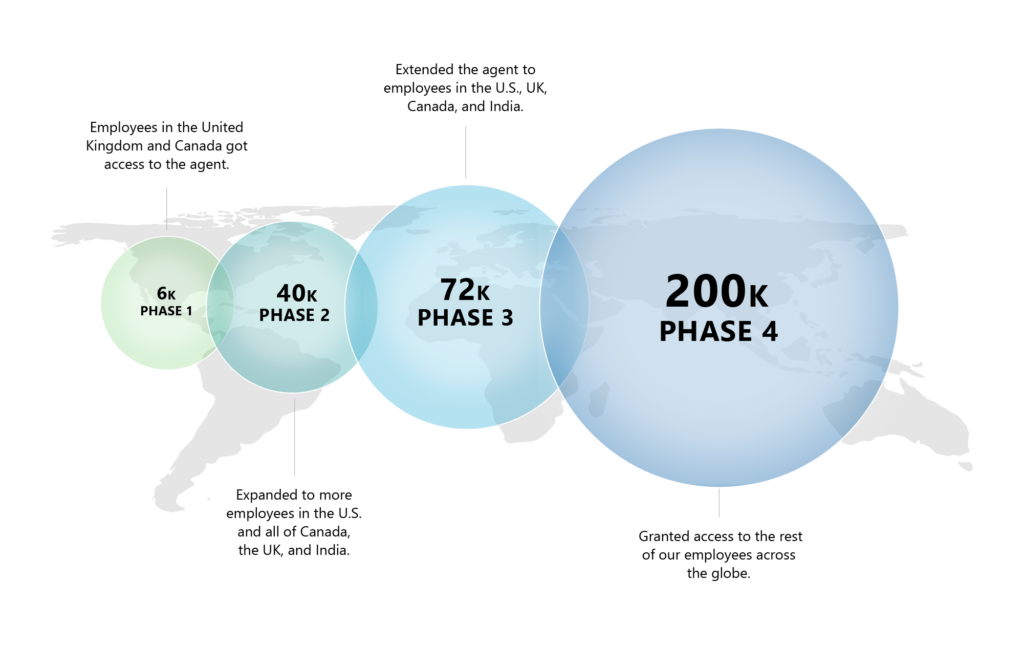
As previously noted, we started our agent with HR content and then added IT support (we later expanded to include campus services help as well). We rolled the agent out to different groups of employees and geographic regions around the world over the course of months, adding new knowledge sources to the different categories at each step along the way. This gave us an opportunity to gather user data and refine performance of the tool as we went.
Adding campus support services required us to handle queries and tasks related to dining, transportation, facilities, and similar subjects. This was a challenging addition, because the facilities and real estate space—unlike the HR and IT support areas—doesn’t have many large service providers, which are easier to provide prebuilt connectors for.
One area that did lend itself to prebuilt connectors, however, was facilities ticketing.
Because many of our campus facilities vendors use Microsoft Dynamics 365, we were able to create an out-of-the-box connector in the agent for their ticketing process. You can take advantage of these kinds of preconfigured tools in your deployment.
Key takeaways
Here are some things to remember when implementing the Employee Self-Service Agent at your organization:
- Decide which starter agent you will deploy first. We recommend starting with a single agent covering one area (vertical), such as HR or IT support, and then expanding from there.
- Consider a phased rollout to allow time to refine responses and ramp up the number of topic areas and knowledge sources installed in your agent.
- Use the prebuilt connectors to make it easier to integrate the agent with your existing systems.We developed customized connectors for major HR and IT service providers and a Microsoft 365 Dynamics connector to integrate with our many facilities vendors around the world.
Learn more
How we did it at Microsoft
- Learn how we’re embracing this “agentic” moment at Microsoft. This post describes how we’re integrating agents into many of our workflows and processes at the company.
- Get our step-by-step guide to how we’re unleashing API-powered agents at Microsoft. This article describes what we’ve learned from deploying agents internally at the company.
Further guidance for you
- Learn how to prepare for a successful Microsoft Employee Self-Service Agent implementation. This Microsoft 365 Copilot Blog story includes a webinar video on the same topic.
- Discover a step-by-step guide to getting your organization prepared for the Employee Self-Service Agent.
- Check out our Microsoft Learn content about deploying the Employee Self-Service Agent.
- Learn more about the customizable accelerator packs that come with the Employee Self-Service Agent.
- Read our Microsoft Learn content about installing the agent.
- Explore Microsoft Learn content about customizing your agent.
- Dive into detailed information about integrating the agent with Workday, ServiceNow, and SAP SuccessFactors.
- Work through this learning path to discover how you can create agents with Copilot Studio.
Chapter 3: Driving adoption by breaking old habits
Once upon a time, when our employees needed help with a technical issue or an HR question, they literally picked up the phone and called the relevant internal phone number. That quickly evolved into an email-centered system, where employee questions were sent to a centralized inbox that would then generate a service request. Still later, chat-based help was introduced.
Using AI to handle employee questions and service requests is a natural step in this evolution, as large-language models were built to parse vast data repositories and return the right information (often with the help of multi-turn queries and responses). And by encouraging self-service, an AI agent can help meet employee needs faster while saving the organization’s staffing resources for other needs.
But getting employees to change their habits and use a tool like the Employee Self-Service Agent wasn’t going to be as easy as just flipping a switch. Here’s how we handled this important change management task at Microsoft.
Adoption across verticals
A key principle that we learned during the adoption process was that 80% of our change management activities for the agent are applicable to all our verticals (whether it be HR, IT support, campus facilities, or another category). We didn’t need to reinvent the wheel each time we added to the topics that the agent covered.
This allowed us to create a change management “playbook” that we could use each time we expanded to a new category. So, while roughly 20% of the strategies we used were specific to that vertical, the vast majority were the same, which saved time as we moved through onboarding the different categories.
Leadership is key
To get our employees to change the way they ask for help, we found it essential to get the support of our key leaders, something we refer to as “sponsorship.”
We found that good sponsorship doesn’t just come from your central product, communications, or marketing groups. It is equally vital to invest in relationships with local leadership in different regions as you roll out the agent (especially in multinational companies like ours).
Local leaders understand the various regional intricacies—including language, functionality, and the rhythm of the business—that can help inspire their segments of the workforce to adopt a new tool, and then evangelize it to others in turn. Working closely with these kinds of sponsors will help you pull off a successful adoption campaign.
If you have works councils, be sure to seek out your representatives and solicit their feedback on your agent experience early on. You can help them understand how the agent was developed and trained, then address any concerns they raise.
We’ve found that once our works councils are made aware of the careful processes we go through to protect user privacy, and to ensure compliance with our Responsible AI standards, they become enthusiastic supporters and can help promote agent adoption. (Read more about our experience with our works councils and the Microsoft 365 Copilot rollout.)
Defining your messaging
Work with your internal communications team to come up with a well-planned messaging framework for your agent rollout. Based on our experience, it’s likely you’ll need to communicate across a wide variety of teams and organizations like HR, IT, facilities, finance, and so on.
It’s important to be clear about how you’re positioning the product for your employees. This will allow you to develop both overall messaging for general use, but also content tailored to specific teams or employee roles. The more sophisticated your messaging, the more likely it is to be effective in encouraging user adoption of the agent in their regular workflow.
Listening to feedback
As Customer Zero for the company, our employees are our best testers and sources of feedback during our product development process. The Employee Self-Service Agent was no different, and we continue to gather crucial feedback and user data throughout the internal adoption process.
Because the agent is a tool centered on helping your workers resolve challenges and get quick answers to questions, you’ll want to set up your own systems for capturing their feedback and make sure the agent is meeting a high-quality bar.
We found that setting yourself up for success when it comes to listening to your employees involves two major aspects: Developing and deploying a system for gathering employee sentiment about the product, and then creating a system for analyzing that feedback and funneling the findings back to your IT team.
Some of the types of feedback and methods we used to gather it during the development process included:
- User-testing data
- User satisfaction ratings
- User surveys, interviews and other research
- Voice of the customer (in-product feedback)
- Pilot projects and focus groups (smaller segments of users)
- IT support incidents
- Usage data and telemetry
- Community-based early adopter feedback (similar to our Copilot Champs community)
- Social media feedback and comments
You can choose from among these options to set up your own feedback mechanisms, or come up with something customized to your implementation.
Calibrating your usage goals
Remember that the Employee Self-Service Agent is not an all-purpose AI tool like Microsoft 365 Copilot, which your employees might use a dozen times a day. Instead, they may only need assistance from HR or IT support, tools, and information sources a few times a week (or even less). Your usage targets should be calibrated accordingly.
At the same time, the more categories of assistance you add to the agent, the more your usage levels can grow—along with user expectations.
When we decided to add campus support (dining, transportation, and facilities-related needs and queries), one of the motivators was to provide information that users might need on a more regular basis. This addition helped us increase adoption and build daily usage habits for the agent among our employees.
Making the agent your front door for employee assistance
Your employees may have longstanding habits around the ways that they seek assistance, such as moving quickly to email a service request, or immediately engaging a live support technician. There might even be someone helpful in the office next to them that they lean on for IT support. We’re aware that breaking such habits can be a challenge.
That’s why we decided to change our own employee-assistance workflows. In the case of HR, we are planning to remove the option to email a centralized alias for help, which was the default in the past. This forcing function will instead prompt our employees to turn to the agent first for assistance, creating a “front door” for all our HR service requests.
For our IT support function, we are switching from a Virtual Agent chatbot to the Employee Self-Service Agent, which should provide users with a richer experience and a higher rate of resolution.
Of course, our main goal is for the agent to handle an employee’s issue without having to seek further assistance. But what happens when the agent cannot resolve their problem or handle their request? That’s why we’ve also implemented a “smooth handoff”—either to create a service request or connect the user to a live agent for specialized assistance.
There are three key steps in this process:
- The Employee Self-Service Agent can identify when the user has reached a point where they need to move to a higher level of assistance via a live agent or a service request. (Note that we also allow the employee to make that determination for themselves.)
- We then give them different options for how they want to connect to live support.
- When the employee is transferred to a live technician, the Employee Self-Service Agent is able to pass on the chat history from its session with the user. That way, the technician or staff support can quickly get up to speed on the situation, see what the employee has already asked about and tried, and start helping them immediately.
Enabling the employee to quickly and smoothly transition to a higher level of support without leaving the chat increases user satisfaction and makes them more likely to return to the agent the next time they need assistance.
Strategic outreach to employees
Of course your workers, like ours, are busy with their day-to-day job functions. They may be resistant to trying a new tool or going through special training on how to access employee assistance. Or they may just not know about it.
Because of our regionally phased rollout of the agent, email was one of the most effective tools we used to connect with specific audiences and make them aware of the tool. With specific email lists, we could make sure that only employees in that phase of the rollout were seeing the message.
A key aspect of getting our employees to adopt any new tool is reinforcement—the process of sustaining behavior change by providing ongoing incentives, recognition, and support. Some of the reinforcement strategies we used for the agent included:
- Targeted communications: Emails and organizational messages invited employees to try the agent as they received access
- Multi-channel campaigns: Promotion of the agent via portals, newsletters, digital signage, and more to keep it at the forefront of employee minds
- Training: Workshops and micro-learning sessions about the agent
- Social campaigns: Posts highlighting the tool to increase awareness and gather employee feedback (see details below)
- Leadership support: Managers modeled usage of the agent and promoted it regularly
- Processes: The tool was part of regular employee workflows
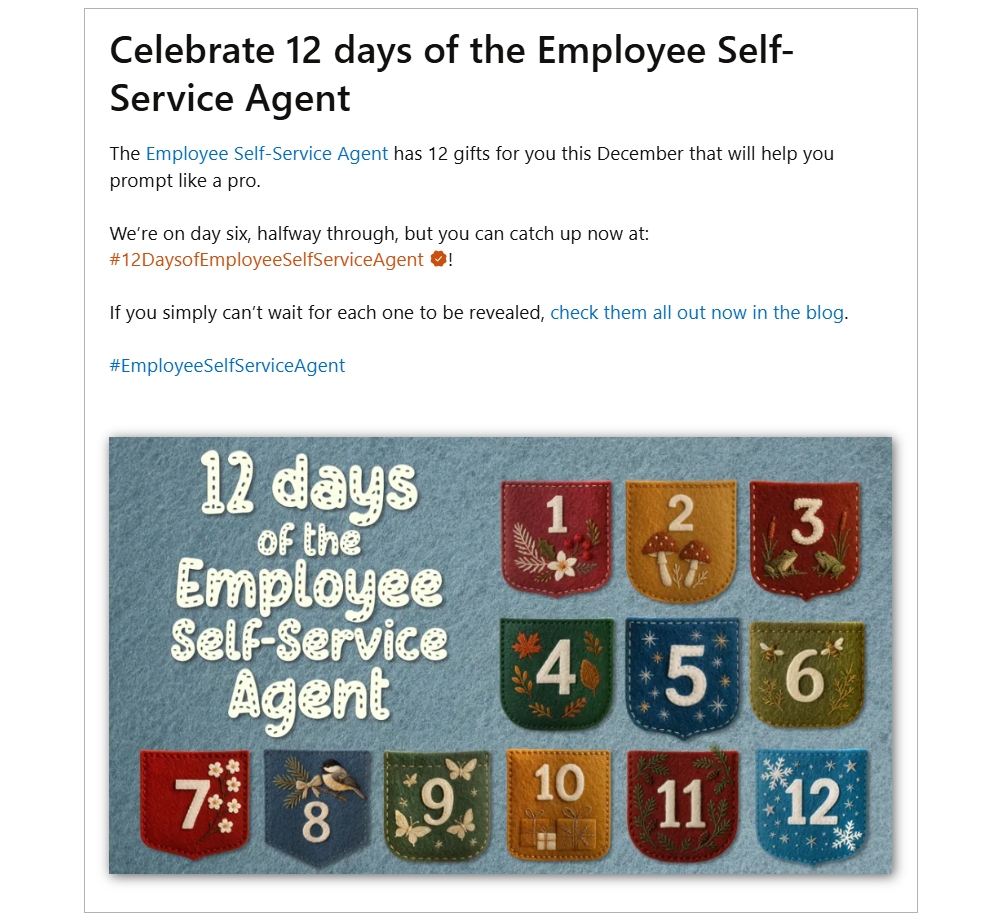
One very important communications channel that we used in our adoption efforts was Microsoft Viva Engage. We set up a private Engage community for the Employee Self-Service Agent, then populated it with each new wave of users as they were given access to the tool (eventually all were given access when the tool went companywide).
We used this channel for various kinds of messaging:
- General product awareness
- Updates on new or changing functionality
- Answering questions or addressing frustrations (two-way dialogue between users and the product team)
- Fun and helpful “tips and tricks” that users could try (these could come from the product team, leadership, or individual product “champions”)
We also inserted messages about the new agent into our regular communications with different audiences, including HR professionals, IT support personnel, and internal comms staff at the company. And we regularly messaged company leaders about it, so they could encourage their teams and direct reports to support the effort and evangelize for the tool.
One thing we did was make clear to our employees that even though the agent was not able to handle an issue today, it might be able to in a month or two. That’s why ongoing communications to users was important.”
Prerna Ajmera, general manager, HR digital strategy and innovation
Of course, as a natural language chat tool, the Employee Self-Service Agent doesn’t require formalized training. The product itself is designed to guide users and allow them to experiment, simply by stating their needs in plain language. Most employees will already be familiar with AI tools like Microsoft 365 Copilot, so effectively using an AI-powered employee-assistance agent should be a low bar to clear.
Managing expectations
Your Employee Self-Service Agent rollout will be an ongoing journey as you add topic areas, functionalities, and other product features. Your product roadmap will evolve as you learn more about what your employees need with this kind of AI solution.
One factor to consider is how to set realistic user expectations about what the agent can do while the product matures and improves. As we gradually rolled out the tool, we messaged that the agent was in “early preview,” which helped avoid employee disappointment when it couldn’t handle a specific request.
“One thing we did was make clear to our employees that even though the agent was not able to handle an issue today, it might be able to in a month or two,” Ajmera says. “That’s why ongoing communications to users was important, as new capabilities were added and speed and accuracy improved.”
We also created messaging for early users indicating that their testing was an integral part of making the tool more effective. This created a positive feedback loop while also keeping employee expectations reasonable.
How we measured success
Carefully tracking and analyzing your success metrics throughout your development and release of the product is a high priority. Without this step, you are working in the dark.
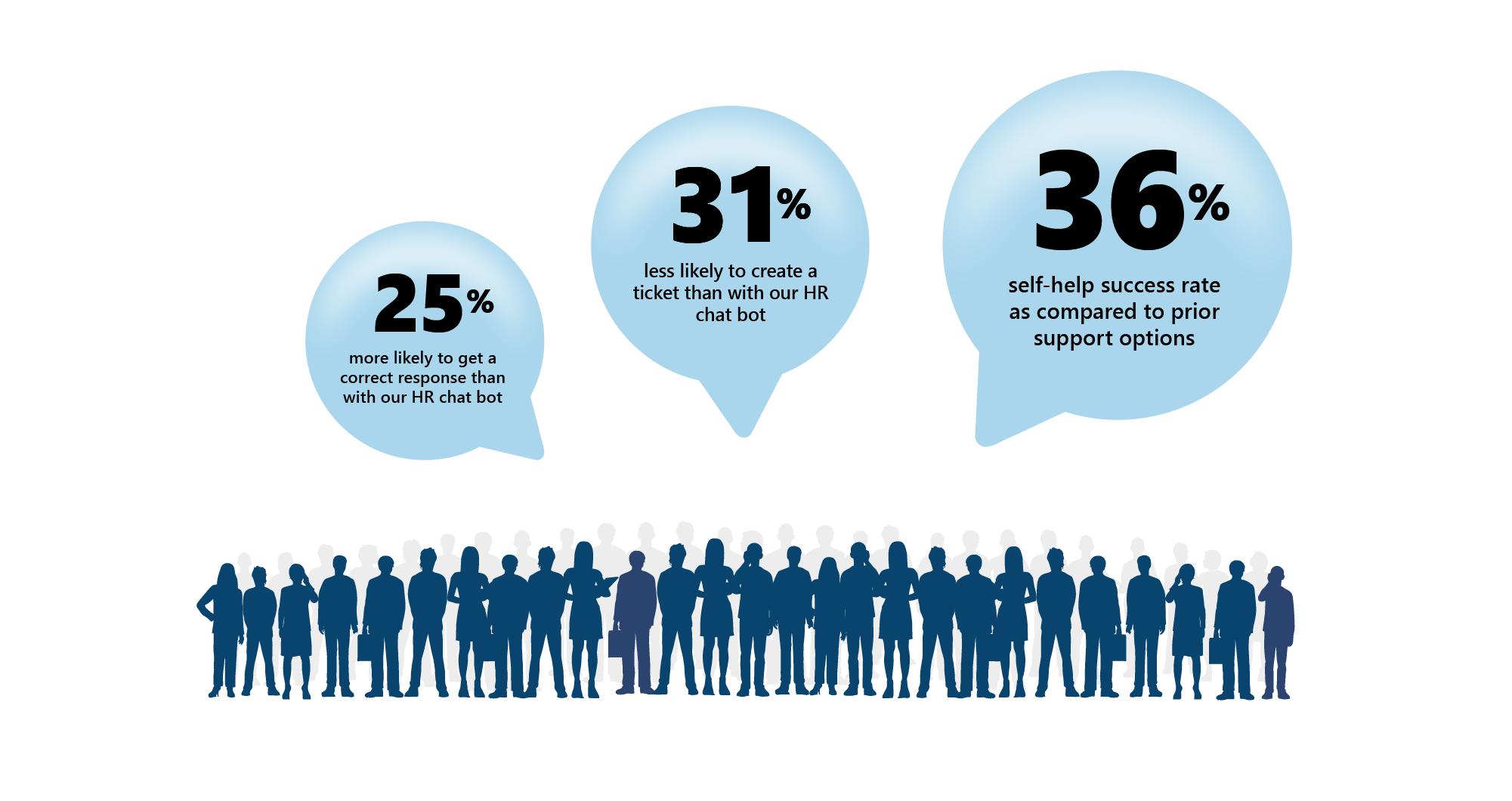
At Microsoft, we identify the key performance indicators (KPIs) for a particular product and then use them as our North Star for any internal release. But the specifics of those KPIs can vary from product to product.
For example, measuring the monthly average user (MAU) statistics might be extremely important for an all-purpose productivity tool like Microsoft 365 Copilot. But for an employee-assistance tool, the goal is not necessarily regular use, because employees aren’t constantly facing challenges that require help (we hope). Usage statistics may also be affected by certain events or cyclical needs, such as annual employee reviews or a major technology change (like a significant Windows update).
With this in mind, we identified certain key metrics for the Employee Self-Service Agent. In this case, the top KPIs included:
- Percentage of support tickets deflected
- Net satisfaction score
- Latency period
- Reliability
- Total time savings
- Total cost savings
- Identified and prioritized issues (reported back to product group)
Overall, we focused on the rate at which employees were able to resolve issues without opening a support ticket, as this would likely generate the greatest return on time and cost savings. We came up with an overall target across the different verticals of 40% ticket deflection, and we’re making solid progress toward this goal as we continue to refine and improve the agent.
Part of our measurement process is a monthly progress meeting of key project stakeholders, where all KPIs are evaluated to see if our targets are being met. If the results do not meet expectations, we identify the potential causes and discuss what adjustments need to be made to address these shortfalls.
Key takeaways
Here are some key things to remember when it comes to adoption efforts for your Employee Self-Service Agent:
- Don’t reinvent the wheel. Most of your change management and adoption strategies for the agent will be the same across different regions and help categories.
- Line up product sponsors. Finding leaders and others across the organization to help you promote the Employee Self-Service Agent within their own groups, functions, and regions can make a big difference in gaining employee trust and encouraging adoption.
- Set up proper listening channels. You’ll want to gather as much feedback as possible from your employees as you roll out the agent so you can understand what is working well and what needs improvement. This kind of feedback loop can also make your employees feel heard and help them shape the tool.
- Make the shift to agent-first help. Employee habits for seeking assistance can be resistant to change. We decided that turning off the “email to create a service ticket” workflow was a great way to nudge our workers to recognize the agent as the first option for their assistance needs.
- Be strategic in your communications. Use tools like email, Viva Engage, and other appropriate communications channels to target your communications and encourage a two-way conversation with employees about the agent. Sharing fun tips and encouraging peer support are other ways to increase awareness and engagement with product.
- Identify your key metrics. We determined our benchmarks for success for this particular type of agent, then tracked them and made the results available to key stakeholders. This allowed us to measure the impact and effectiveness of the product.
Learn more
How we did it at Microsoft
Although some of the blog posts below are about adoption efforts related to Microsoft 365 Copilot, they can give you ideas on how we promote internal adoption of agentic AI products at Microsoft.
- Find out how we’re reimagining campus support with the Employee Self-Service Agent. This post describes how we targeted popular employee queries—such as “What’s for lunch?”—to drive adoption of our new agentic tool in the facilities and real estate space.
- Read about how we drove Copilot adoption using Microsoft Viva. This article explains how Viva provides a powerful suite of tools that can assist with your adoption efforts.
- Learn how we created an internal Microsoft 365 Copilot Champs community to help drive adoption of the tool. This article covers how we created a special community of Copilot enthusiasts at Microsoft, who provided peer training and support for their coworkers’ Copilot journeys.
- Discover how we built an AI-powered continuous improvement culture at Microsoft. This article provides a detailed examination of how we use data to track adoption and continuously improve our products and processes within Microsoft.
- See how we’re supercharging our internal communications with Microsoft Viva. This post explains how we use tools like Viva engage to build trust and encourage two-way dialogue with our employees about important topics, company initiatives, and key product rollouts.
Further guidance for you
Begin your journey with the Employee Self-Service Agent
Agentic AI offers incredible promise to transform employee productivity, giving individuals access to powerful tools that enable them to accomplish more. We believe the Employee Self-Service Agent is another step along that path, allowing workers to get instant help with tasks that used to be cumbersome and time-consuming.

“We’re excited to get the Employee Self-Service Agent out and into the hands of our customers, so that they can reap the same benefits that we’re already seeing from it. As we continue to refine the product and expand the number of verticals it can cover, we expect to realize exponential efficiency gains and capture even more cost savings across our entire organization.”
Brian Fielder, vice president, Microsoft Digital
Now that you’ve read about our experience deploying the tool, it’s time to start your own journey. Successful implementation means your people will spend less time on the phone with support staff or hunting through web pages and other resources for help with routine employment tasks and more time devoted to their productive work, reducing job-related pain points and frustrations.
You can benefit from the lessons we’ve learned and the many helpful features and capabilities that we’ve built into this product, all of which are designed to make your implementation as fast, easy, and effective as possible.
“We’re excited to get the Employee Self-Service Agent out and into the hands of our customers, so that they can reap the same benefits that we’re already seeing from it,” says Brian Fielder, vice president of Microsoft Digital. “As we continue to refine the product and expand the number of verticals it can cover, we expect to realize exponential efficiency gains and capture even more cost savings across our entire organization.”
Key takeaways
Here are some of the essential top-level learnings we gleaned from our deployment of the Employee Self-Service Agent, which you should keep in mind as you start out on your own deployment path:
- Identify and engage the right people. You’ll need buy-in and advocacy from leaders across the organization; the involvement of key stakeholders from HR, IT, legal, and compliance; and technical guidance from admins, license administrators, environment makers, and knowledge-base subject matter experts.
- Develop your plan. Understand the major phases of governance, implementation, and adoption of the tool, and make sure that you have adequate resources and support for each phase.
- Verify the quality of your content. Your chances of success will be better if you undertake a thorough content assessment to address the currency, accuracy, and structure of all relevant knowledge bases. Pay particular attention to the topics and tasks that are in greatest demand by employees when they access help services.
- Consider a phased rollout. Releasing your Employee Self-Service Agent to progressively larger groups of workers across your organization allows you to gather data and feedback and improve the performance and relevance of the agent over time. You can also expand the number of categories that your agent covers as you go, increasing the impact and appeal of the tool.
- Communicate strategically to promote adoption. Convincing employees to break longstanding habits when seeking help is a challenge. Email is helpful for targeting specific groups of employees, but be sure to use tools like Viva Engage to create community, answer questions, provide fun tips and tricks, and announce new capabilities and options.
- Set clear goals and measure against them. Come up with a targeted set of KPIs that reflect your organization’s needs and aspirations, then develop a plan to capture data for each of these indicators and a regular reporting cadence to keep stakeholders informed of progress toward your goals.
Learn more
How we did it at Microsoft
- Read the official Employee Self-Service Agent product release announcement.
- Learn how we’re accelerating employee services at Microsoft with the Employee Self-Service Agent.
- View a series of Microsoft Learning Community videos about deploying the Employee Self-Service Agent.
- Explore the Microsoft Learn content related to the Employee Self-Service Agent.
- Discover how we’re tackling Microsoft 365 Copilot governance internally at Microsoft.
- Explore our leaders’ guide to enterprise AI maturity in five steps.
- Watch a video from the Understanding Microsoft Agents series devoted to the Employee Self-Service Agent.

Try it out