
Identity-based cyberthreats are on the rise. 2023 saw a tenfold increase in threats including phishing, ransomware, and more.1 And bad actors continue to evolve their techniques—making them more sophisticated, more overwhelming, and more believable. From an employee’s viewpoint, every ping, click, swipe, buzz, ding, text, and tap takes time and attention—which can add up to a loss of focus, alert fatigue, and increased risk. In this post, we’ll look at a human-operated ransomware attack that began with one malicious link in one user’s email. Then we’ll share how Microsoft Incident Response helped facilitate collaboration among security, identity, and incident response teams to help a customer evict the bad actor from their environment and build resilience for future threats.
Microsoft Incident Response
Strengthen your security with an end-to-end portfolio of proactive and reactive cybersecurity incident response services.

One click opens the door to a threat actor
We know that 50% of Microsoft cybersecurity recovery engagements relate to ransomware,2 and 61% of all breaches involve credentials.3 Identity attacks continue to be a challenge for businesses because humans continue to be a central risk vector in social engineering identity attacks. People click links without thinking. Too often, users open attachments by habit, thereby opening the door to threat actors. Even when employees recognize credential harvesting attempts, they’re often still susceptible to drive-by URL attacks. And teams focused on incident response are often disconnected from teams that manage corporate identities. In this incident, one click on a malicious link led a large customer to reach out to Microsoft Incident Response for help.
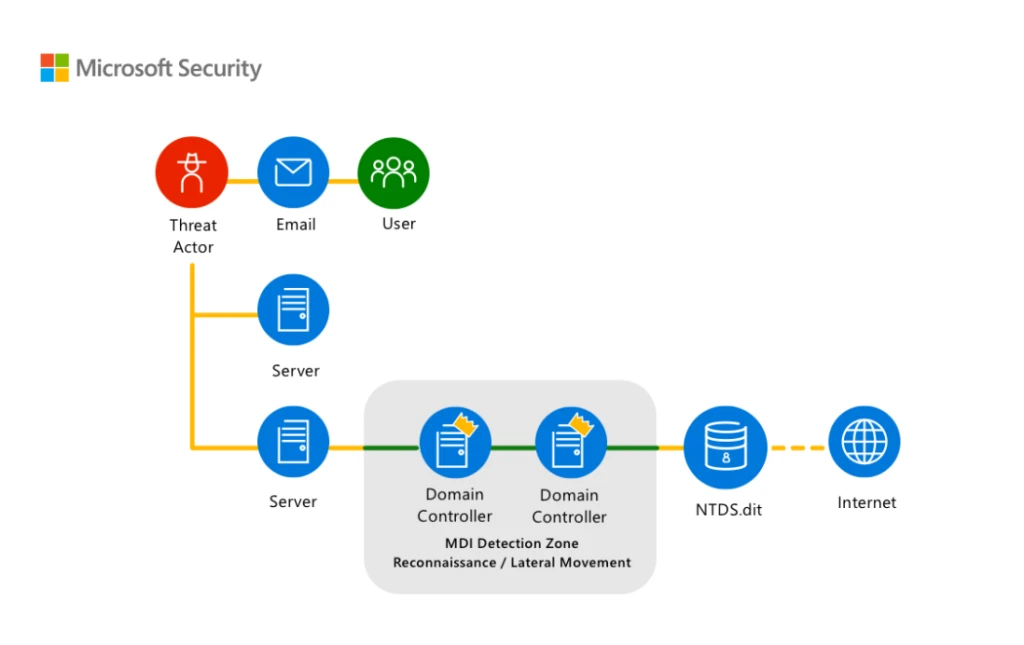
Figure 1. Diagram of a threat actor’s malware moving through the network.
The malicious link the employee clicked infected their device with Qakbot. Qakbot is a modular malware that has been evolving for more than a decade. It’s a multipurpose malware that unfortunately gives attackers a wide range of capabilities. Once the identity-focused threat actor had established multiple avenues of persistence in the network and seemed to be preparing to deploy ransomware, the customer’s administrators and security operations staff were overwhelmed with tactical recovery and containment. That’s when they called Microsoft.
Your first call before, during, and after a cybersecurity incident
Microsoft Incident Response stepped in and deployed Microsoft Defender for Identity—a cloud-based security solution that helps detect and respond to identity-related threats. Bringing identity monitoring into incident response early helped an overwhelmed security operations team regain control. This first step helped to identify the scope of the incident and impacted accounts, take action to protect critical infrastructure, and work on evicting the threat actor. Then, by leveraging Microsoft Defender for Endpoint alongside Defender for Identity, Microsoft Incident Response was able to trace the threat actor’s movements and disrupt their attempts to use compromised accounts to reenter the environment. And once the tactical containment was complete and full administrative control over the environment was restored, Microsoft Incident Response worked with the customer to move forward to build better resiliency to help prevent future cyberattacks. More information about the incident and remediation details can be found on our technical post titled “Follow the Breadcrumbs with Microsoft Incident Response and Microsoft Defender for Identity: Working Together to Fight Identity-Based Attacks.”
Strengthen your identity posture with defense in depth
Defend against human-operated ransomware attacks with Microsoft Copilot for Security
We know protecting user identities can help prevent incidents before they happen. But that protection can take many forms. Multiple, collaborative layers of defense—or defense in depth—can help build up protection so no single control must shoulder the entire defense. These layers include multifactor authentication, conditional access rules, mobile device and endpoint protection policies, and even new tools—like Microsoft Copilot for Security. Defense in depth can help prevent many cyberattacks—or at least make them difficult to execute—through the implementation and maintenance of layers of basic security controls.
In a recent Cyberattack Series blog post and report, we go more in depth on how to protect credentials against social engineering attacks. The cyberattack series case involved Octo Tempest—a highly active cyberthreat actor group which utilizes varying social engineering campaigns with the goal of financial extortion across many business sectors through means of data exfiltration and ransomware. Octo Tempest compromised a customer with a targeted phishing and smishing (text-based phishing) attack. That customer then reached out to Microsoft Incident Response for help to contain, evict, and detect any further threats. By collaborating closely with the victim organization’s IT and security teams, the compromised systems were isolated and contained. Throughout the entire process, effective communication and coordination between the incident response team and the affected organization is crucial. The team provides regular updates on their progress, shares threat intelligence, and offers guidance on remediation and prevention strategies. By working together seamlessly, the incident response team and the affected organization can mitigate the immediate cyberthreat, eradicate the cyberattacker’s presence, and strengthen the organization’s defenses against future cyberattacks.
Honeytokens: A sweet way to defend against identity-based attacks
Another layer of protection for user identities is the decoy account. These accounts are set up expressly to lure attackers, diverting their attention away from real targets and harmful activities—like accessing sensitive resources or escalating privileges. The decoy accounts are called honeytokens, and they can provide security teams with a unique opportunity to detect, deflect, or study attempted identity attacks. The best honeytokens are existing accounts with histories that can help hide their true nature. Honeytokens can also be a great way to monitor in-progress attacks, helping to discover where attackers are coming from and where they may be positioned in the network. For more detailed instructions on how to tag an account as a honeytoken and best practices for honeytoken use, read our tech community post titled “Deceptive defense: best practices for identity based honeytokens in Microsoft Defender for Identity.”
Working together to build better resilience
Microsoft Incident Response is the first call for customers who want to access dedicated experts before, during, and after any cybersecurity incident. With on-site and remote assistance on a global scale, unprecedented access to product engineering, and the depth and breadth of Microsoft Threat Intelligence, it encompasses both proactive and reactive incident response services. Collaboration is key. Microsoft Incident Response works with the tools and teams available to support incident response—like Defender for Identity, Defender for Endpoint, and now Copilot for Security—to defend against identity-based attacks, together. And that collaboration helps ensure better outcomes for customers. Learn more about the Microsoft Incident Response proactive and reactive response services or see it in action in the fourth installment of our ongoing Cyberattack Series.
To learn more about Microsoft Security solutions, visit our website. Bookmark the Security blog to keep up with our expert coverage on security matters. Also, follow us on LinkedIn (Microsoft Security) and X (@MSFTSecurity) for the latest news and updates on cybersecurity.
1Microsoft Digital Defense Report, Microsoft. 2023.
2Microsoft Digital Defense Report, Microsoft. 2022.
32023 Data Breach Investigations Report, Verizon.
4Microsoft Entra: 5 identity priorities for 2023, Joy Chik. January 9, 2023.