

Cybercriminals use social engineering during holidays and important events like tax season to steal user information. Our new Microsoft Threat Intelligence tax season report outlines some of the various techniques that threat actors use to craft their campaigns and mislead taxpayers into revealing sensitive information, making payments to fake services, or installing malicious payloads. These include phishing emails, text message phishing (smishing), malicious advertising, and voice phishing (vishing). The Microsoft Threat Intelligence tax season report also shows how threat actors impersonate tax payment processors in phishing emails, what cybercriminals are looking for and who they are targeting, how they can get your data, and, most importantly, how you and your organization can stay safe. Although these are well-known, longstanding techniques, they’re still highly effective and are amplified even more during this time of year.
Tax-related fraud campaigns
Although everyone is susceptible to tax-season phishing, we have noted that certain groups of people are more vulnerable than others. Prime targets include individuals who may be less informed about government tax procedures and methods—green card holders, small business owners, new taxpayers under the age of 25, and older taxpayers over 60.
At the end of January 2024, Microsoft Threat Intelligence observed a campaign using lures masquerading as tax-related documents provided by employers. The phishing email contained an HTML attachment that directed the user to a fake landing page. This page hosted malicious executables and once the target clicked on the “Download Documents” prompt, malware installed on their computer.
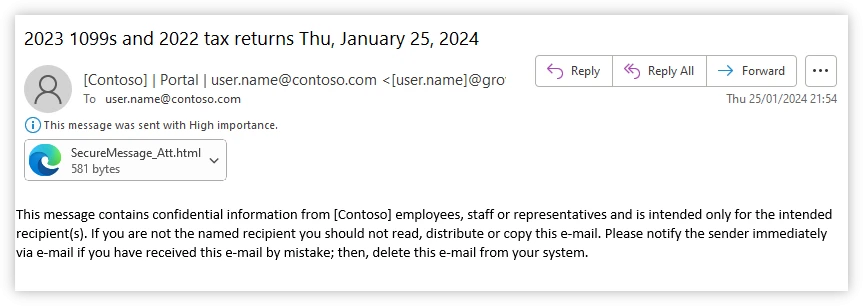
Figure 1. Phishing email using tax lures.
The malicious executable file dropped on the target’s machine had information stealer capabilities. Once in the environment, it attempted to collect information including login credentials.
Be diligent around phishing emails
Phishing email campaigns around tax season use a variety of tactics to trick users into believing they represent legitimate sources. These include spoofing the landing pages of genuine services or websites, using homoglyph domains, and customizing phishing links for each user. Threat actors typically impersonate employers and human resources personnel, the Internal Revenue Service (IRS), or taxation-related entities such as state tax organizations or tax preparation services.
Phishing emails may contain malicious attachments like HTML files, PDF files, or ZIP archives. The cybercriminal tries to exploit the recipients’ trust in the perceived sender to trick them into opening these attachments. When they do, malware is automatically downloaded onto their machine. Threat actors also commonly send URLs that direct users to fraudulent websites that host malware.
Tax season cybersecurity best practices
The best defense against cybercriminals, both at tax season and throughout the year, is education and good cyber hygiene. Education means phishing awareness—knowing what phishing attempts look like and what to do when they’re encountered. Good cyber hygiene means implementing basic security measures like multifactor authentication for financial and email accounts. With multifactor authentication enabled, you can prevent 99.9% of attacks on your accounts.
Ways to help protect yourself from phishing
Falling for a phishing attack can lead to a number of unwanted outcomes including leaked confidential information, infected networks, financial demands, corrupted data, and more. Here are a few tips to help protect yourself:
- Inspect the sender’s email address. Is everything in order? A misplaced character or unusual spelling could signal a fake.
- Be wary of emails with generic greetings (“Dear customer,” for example) that ask you to act urgently.
- Look for verifiable sender contact information. If in doubt, do not reply. Start a new email to respond instead.
- Never send sensitive information by email. If you must convey private information, use the phone.
- Think twice about clicking unexpected links, especially if they direct you to sign into your account. To be safe, log in from the official website instead.
- Avoid opening email attachments from unknown senders or friends who do not usually send you attachments.
- Install a phishing filter for your email apps and enable the spam filter on your email accounts.
To learn more about the latest observed tax season phishing campaigns, social engineering fraud, and tips on how to stay ahead of these types of attacks during tax season and other holidays, read the Microsoft Threat Intelligence tax season report. For a deeper look into social engineering fraud tactics, read Feeding from the trust economy: social engineering fraud, and watch the session from Microsoft Ignite 2023 called The risk of trust: Social engineering threats and cyber defense.
Keeping a pulse on today’s threats
The Microsoft Threat Intelligence team tracks hundreds of threat actor groups worldwide, with more than 10,000 security experts analyzing more than 78 trillion signals daily to uncover the latest insights. Microsoft Threat Intelligence’s global network of security and intelligence teams includes engineers, researchers, data scientists, cybersecurity experts, threat hunters, geopolitical analysts, investigators, and frontline responders across 77 countries. These experts come together to help share timely insights about the ever-expanding attack surface and provide actionable guidance through resources like the annual Microsoft Digital Defense Report, nation-state reports, the Microsoft Threat Intelligence podcast, Cyber Signals report, and digital briefings. To read the latest reports, threat briefs, or learn about the tactics and techniques from some of the more than 300 threat actors that we monitor and to get behind the scenes and watch interviews with threat intelligence experts, visit Security Insider.
Microsoft Threat Intelligence
Read the new tax season report to learn about the techniques that threat actors use to mislead taxpayers.

To learn more about Microsoft Security solutions, visit our website. Bookmark the Security blog to keep up with our expert coverage on security matters. Also, follow us on LinkedIn (Microsoft Security) and X (@MSFTSecurity) for the latest news and updates on cybersecurity.