

Enterprises used to be able to secure their corporate perimeters with traditional network controls and feel confident that they were keeping hackers out. However, in a mobile- and cloud-first world, in which the rate and the sophistication level of security attacks are increasing, they can no longer rely on this approach. Taking a Zero Trust approach can help to ensure optimal security without compromising end user application experiences.
Microsoft has a long history of working with customers on how to protect against a broad range of security attacks and we are one of the largest producers of threat intelligence built on the variety of data that flows through our network.
Today, I’d like to share how you can be successful implementing the Zero Trust model by rethinking your network strategy. Here’s a video that will give you a quick overview:
Over a series of three blogs (of which this is the first), we will take a deeper dive into the aspects of the Networking pillar in the Microsoft Zero Trust security model. We will go through each of the dimensions listed (network segmentation, threat protection, and encryption) and show design patterns and helpful guidance on using Microsoft Azure services to achieve optimality.
As mentioned in our Maturity Model paper, all data is ultimately accessed over network infrastructure. Networking controls can provide critical “in pipe” controls to enhance visibility and help prevent attackers from moving laterally across the network. Networks should be segmented (including deep in network micro-segmentation) and real-time threat protection, end-to-end encryption, monitoring, and analytics should be employed.
Maturity model

We will go over the first one, network segmentation, in this blog. One thing to keep in mind is that while moving straight from the traditional stage to optimal is ideal, most organizations will need to take a phased approach that generally follows along the maturity model journey.
The need for network segmentation
If you refer to the three core principles (Verify Explicitly, Use Least Privilege Access, and Assume Breach), a Zero Trust approach encourages you to think that a security incident can happen anytime and you are always under attack. One of the things you want to be ready with is a setup that minimizes the blast radius of such an incident—this is where segmenting your network while you design its layout becomes important. In addition, by implementing these software-defined perimeters with increasingly granular controls, you will increase the “cost” to attackers to propagate through your network and thereby dramatically reduce the lateral movement of threats.
Network segmentation in Azure
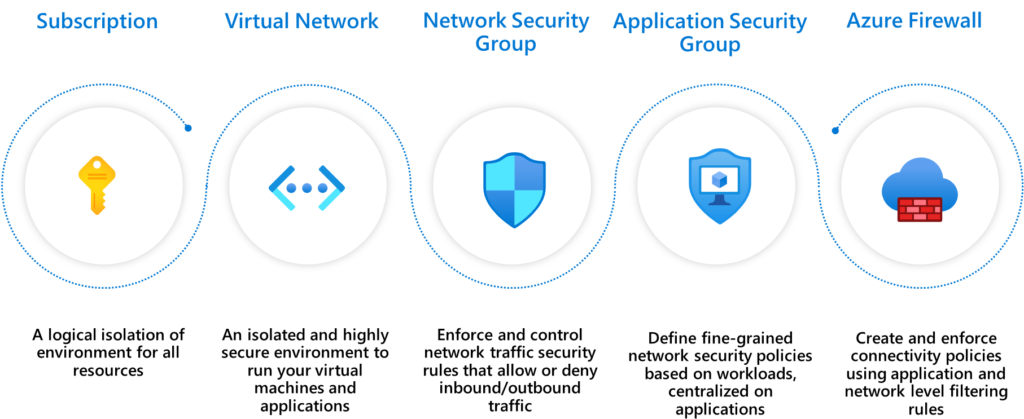
When you operate on Azure, you have a wide and diverse set of segmentation controls available to help create isolated environments. Here are the five basic controls that you can use to perform network segmentation in Azure:
Segmentation patterns
There are three common segmentation patterns when it comes to organizing your workload in Azure:
- Single Virtual Network
- Multiple Virtual Networks with peering
- Multiple Virtual Networks in hub-and-spoke model
Each of these provide a different type of isolation and connectivity. As to which one works best for your organization is a planning decision based on your organization’s needs. Here’s where you can read about Segmenting Virtual Networks in more detail and learn how each of these models can be done using Azure Networking services.
The internet boundary
Whether you are building a modern application in the cloud or you just migrated a set of applications to Azure, most applications require some ability to send and receive data to/from the public internet. Any time you expose a resource to a network you increase threat risk, and with internet exposure this is further compounded by a large set of possible threats.
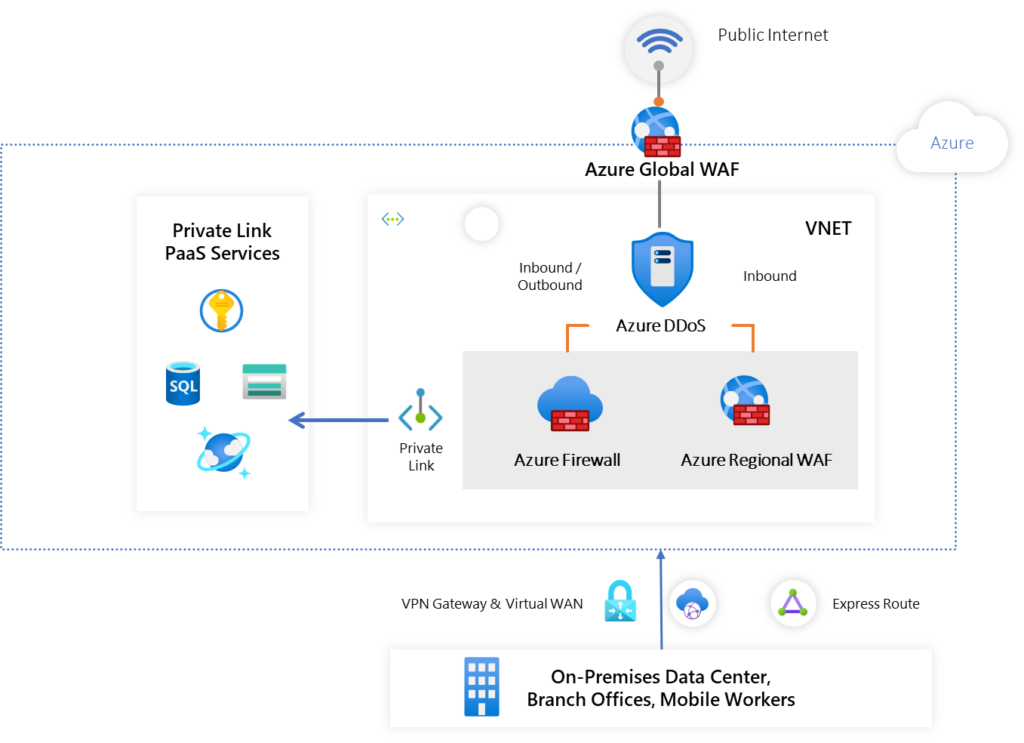
The recommended approach in Azure is to use Azure DDoS Protection Service, Azure Firewall, and Azure Web Application Firewall to provide comprehensive threat protection. This setup of having an internet boundary using these services is important in a segmentation architecture since it essentially segments your application stack away from the internet while providing carefully inspected traffic to/from it.
The datacenter or on-premises network boundary
In addition to internet connectivity, your application stack on Azure might need connectivity back to your IT footprint in your on-premises datacenter(s) and/or other public clouds. You have multiple options to achieve that: you can choose to have direct connectivity using Express Route, use our VPN Gateway, or have a more unified distributed connectivity experience using Azure Virtual WAN. The same concept of segmenting away your application stack applies here, so that any threats that might affect your datacenter or on-premises network will have a harder time propagating to your cloud platform (and vice-versa).
The PaaS services boundary
As with most modern applications, chances are that your application will be using one of the many platform-as-a-service (PaaS) offerings available on Azure. Some examples of PaaS services you may want your application to call into include Azure Storage, Azure SQL Database, and Azure KeyVault. These are segmented away from your workload in an Azure virtual network since they run as a separate service built and operated by Azure.
On top of this built-in segmentation of PaaS services, Azure also makes it possible for you to do all your interactions with these services in the private address space using Azure PrivateLink. This connectivity capability ensures that all your interactions with PrivateLink-enabled PaaS services are done securely and all data exchanged remains in the Microsoft Network.
In closing
Networking represents a great opportunity to make meaningful headway in your Zero Trust journey. Your Zero Trust efforts will not only help your security posture, but most efforts will also help you modernize your environment and improve organizational productivity. In this blog, we discussed how you can use networking services from Azure to build three types of segmentation patterns. In future blogs, we will dive deeper into how you can do the same for threat protection and encryption, the other two dimensions in the networking pillar described in our Zero Trust vision paper. In the meantime, we also invite you to watch our Ignite session to get additional information about network security offerings from Azure.
Make sure to check out the other deployment guides in the series by following the Microsoft Security blog. For more information on Microsoft Security solutions, visit our website. Bookmark the Security blog to keep up with our expert coverage on security matters. Also, follow us at @MSFTSecurity for the latest news and updates on cybersecurity.