Microsoft Copilot Studio is giving makers new ways to build agents that can reason through complex work, draw on richer context, and use a growing range of tools and capabilities to get real work done.
At the center of the latest Copilot Studio updates is the general availability of the GitHub Copilot harness, the new foundation for building reasoning-heavy agents and workflows in Copilot Studio. Alongside the harness, recent updates add new ways for agents to use skills, memory, enterprise knowledge, workflows, model context protocol (MCP) servers, connected agents, files, and more.
Build agents and workflows for complex business processes with the GitHub Copilot harness
The GitHub Copilot harness is now generally available in Copilot Studio. This advanced harness is designed for reasoning-heavy agents and workflows that need to complete complex business processes.
The harness sits between the AI model and the agent or workflow you build, orchestrating how the components work together. It helps determine when to call the model, what context to provide, and which tools, MCP servers, or connected agents to use. This allows agents and workflows to plan steps and adapt their approach as they work toward the defined goal in a recursive manner. Basically, rather than relying on predefined paths, the agent or workflow can adjust its execution path based on the goal and the available inputs.
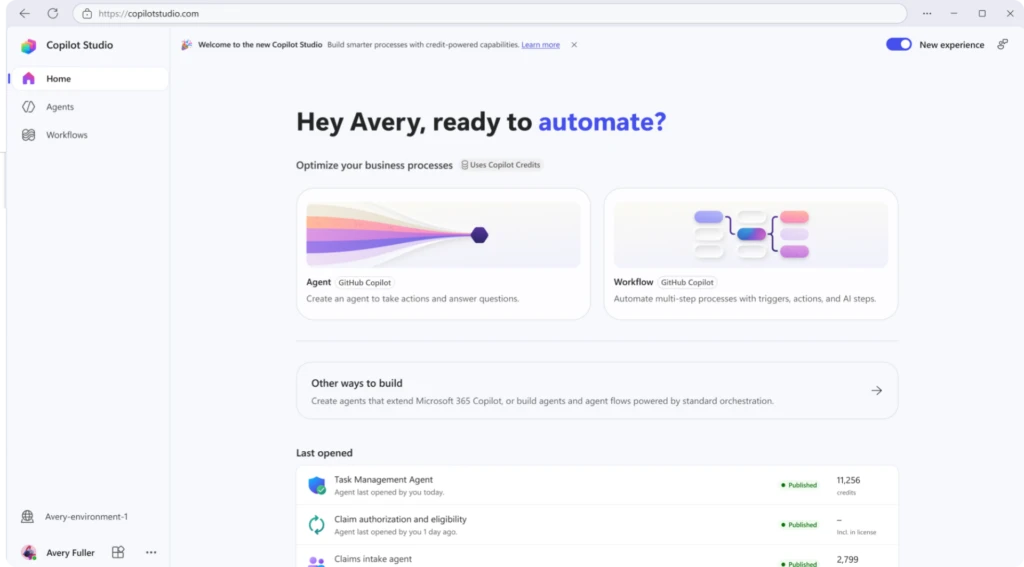
The harness also supports capabilities like skills and memory (see next section) and can natively create and edit Word, Excel, PowerPoint, and PDF files. Each task runs in a secure sandbox governed by Copilot Studio.
All this makes the GitHub Copilot harness particularly well suited for scenarios that combine reasoning with action across multiple steps. For example, an accounts payable agent could read invoices, match them to purchase orders, gather missing information, and route exceptions for approval.
The GitHub Copilot harness is available alongside the standard harness, so you can choose the foundation that best fits what you’re building. Learn more about choosing a harness.
Expand what your agents can do with skills, tools, and connected agents
The most useful agents can do more than answer questions. New capabilities for agents powered by the GitHub Copilot harness give you more ways to equip agents for the work you want them to perform:
- Skills let you package instructions into modular, reusable capabilities. Write a skill or upload an existing skill, add it to multiple agents, and share it with your teammates. This feature helps teams reuse proven approaches instead of rebuilding the same capability for every agent.
- For larger solutions, connected agents (in preview) let a primary agent delegate requests to specialized agents. This can help you create modular agent architectures where one agent serves as the front door and calls specialists for particular tasks.
- Now in generally available, you can also add workflows and MCP servers as tools. Workflows can give agents access to multistep deterministic automation, while MCP servers can connect them to external services and capabilities.
- With the Windows 365 for Agents MCP server, now generally available, agents can interact with a Windows 365 Cloud PC to work with desktop applications, browsers, and user interfaces.
The goal with these capabilities is to help teams move from building isolated agents to creating reusable, extensible agent solutions. Being able to build on proven components and specialized capabilities means complex agents are easier to develop, maintain, and scale across the organization.
Give agents richer context with knowledge, memory, and files
The right context can help an agent deliver more relevant responses and take more appropriate actions as it works.
With Work IQ in Copilot Studio (preview), agents powered by the GitHub Copilot harness can connect to organizational context such as emails, calendar events, files, Microsoft Teams messages, and people information. You can also connect an agent to Foundry IQ to use a knowledge base you’ve already built and tuned in Microsoft Foundry.
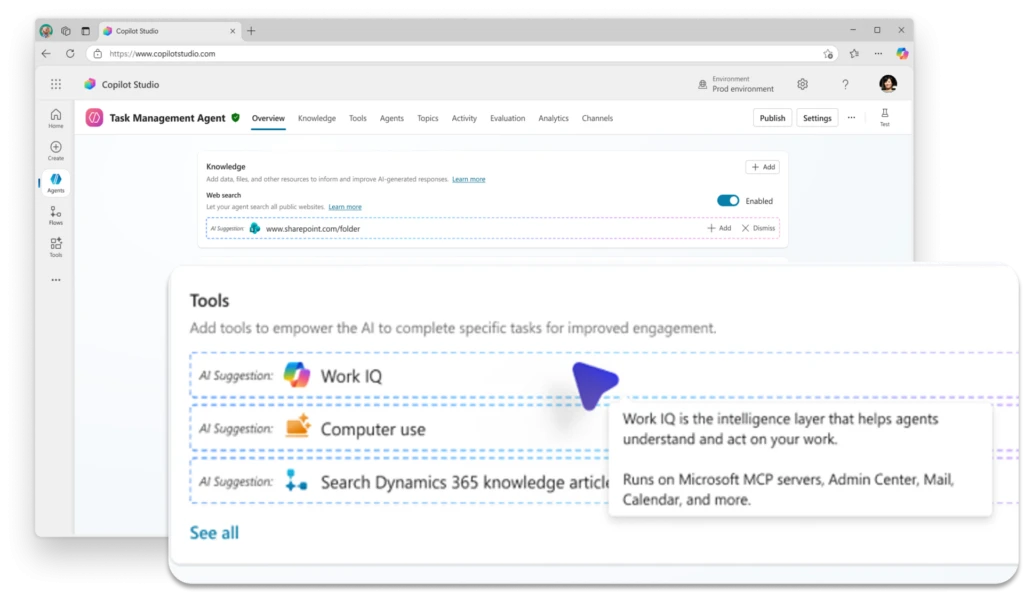
Memory (also in preview) adds another source of context by allowing an agent to retain relevant information from previous interactions with an individual user. When enabled, memory can capture preferences and patterns and apply them in later conversations, helping you build experiences that become more relevant over time.
Agents can also take on larger, more complex document-based work. Now in preview, users can give agents files to analyze and work with directly, unlocking scenarios that require agents to reason over substantial documents and use what they find to complete a broader task. Users can also view files the agent creates during the conversation.
These capabilities all help agents work with a deeper understanding of the organization, the task, and the individual user. That richer context can reduce the need for users to repeatedly supply information and help agents not only deliver more relevant responses, but support more complex, ongoing work.
Manage agents with greater visibility and control
New Copilot Studio capabilities give administrators more ways to manage agents within their existing security and governance practices. Recent updates strengthen agent-level identity, expand environment-level observability, and add new trust signals for MCP servers.
First, as of July 2026, Copilot Studio automatically creates a Microsoft Entra Agent ID for every new agent. This gives individual agents their own identity in Microsoft Entra and helps administrators apply identity and access controls at the agent level.
For agents using MCP servers, you can also now submit an MCP server for Microsoft certification. Certification provides customers and administrators with additional information that an MCP server has been evaluated against Microsoft expectations for areas including reliability, security, compliance, and responsible operation.
Finally, with environment-level agent telemetry, now in preview, administrators can export telemetry from Copilot Studio to Application Insights through the Microsoft Power Platform admin center. Use this feature to validate agent runs, monitor tool execution, create alerts, and build custom dashboards for operational analysis.
Together, these updates help organizations treat agents as governed enterprise assets, with clearer identity, trusted connections, and the operational insight administrators need to manage them confidently at scale.
Reach customers across voice and digital channels with real-time agents
Real-time agents are expanding capabilities and channels. You now have new options for where you deploy them, how you customize voice experiences, and how you monitor performance.

Previously available for voice experiences, real-time agents can now also be deployed to digital messaging channels. Currently in preview, this feature allows you to use the same agent configuration across voice and digital messaging to create more consistent, context-aware customer experiences without maintaining separate agents for each channel.
For voice experiences, you can now use GPT-5 Chat. The model, also in preview, uses a text-based voice architecture that converts speech to text, generates a response, and synthesizes it back to speech. This enables advanced voice customization with neural text to speech, as well as greater deployment flexibility.
Finally, you can monitor real-time agents with Application Insights in Azure Monitor, which gives you more visibility into agent performance and helps you identify and troubleshoot issues.
Learn more about real-time agents and best practices for managing them at scale.
More improvements to help you build
A few more Copilot Studio updates help make everyday agent authoring more flexible:
- Choose from more models. Claude Sonnet 5 and GPT-5.5 Chat are now generally available as primary models, giving you more options to match model capabilities to your agent scenario.
- Build with the right foundation for the job. With multiple harness options available in Copilot Studio, you can choose between reasoning-heavy, multi-step experiences and more structured, predictable agent scenarios based on what you need to build.
The latest Copilot Studio updates give makers more building blocks for agents that can reason, act, collaborate, and work with richer context—while giving organizations more ways to manage those capabilities as their agent ecosystems grow.
What comes next
The significance of these updates goes beyond any single feature. Copilot Studio now has more of the building blocks needed for agents to take on consequential business processes: stronger reasoning, reusable capabilities, richer context, more ways to act, and enterprise controls to support them.
That opens the door to a much broader range of agent use cases. As makers begin combining these capabilities in new ways, the question is shifting from what an agent can do toward what work an organization is ready to give it.
Stay up to date on all things Copilot Studio
More is coming across voice channels, workflows, and the building experience. Check out all the updates as we ship them, as well as new features releasing in the next few months here: What’s new in Microsoft Copilot Studio.
Reimagine business processes
Discover how AI agents can help your organization work smarter and move faster.