On August 1st, 2013, we announced the availability of Message Center. Message Center was created to improve our communications with customers on changes that impact the Office 365 environment. Over the past few months, we have been working hard on improving the functionality. One of the enhancements include improving the visibility of Message Center by adding it to the service overview dashboard on the admin landing page for enterprise customers. See below.
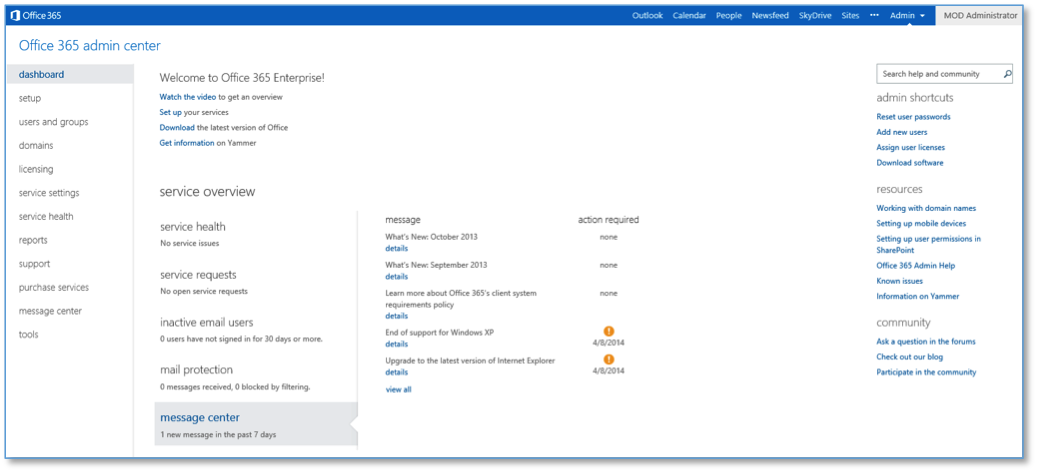
Another enhancement that we are enabling today is the ability to send you messages that are targeted to your company. Previously, targeted messages were sent to your inbox but now, they will arrive in your Message Center thus centralizing all Office 365 related messaging as well as helping you manage your inbox.
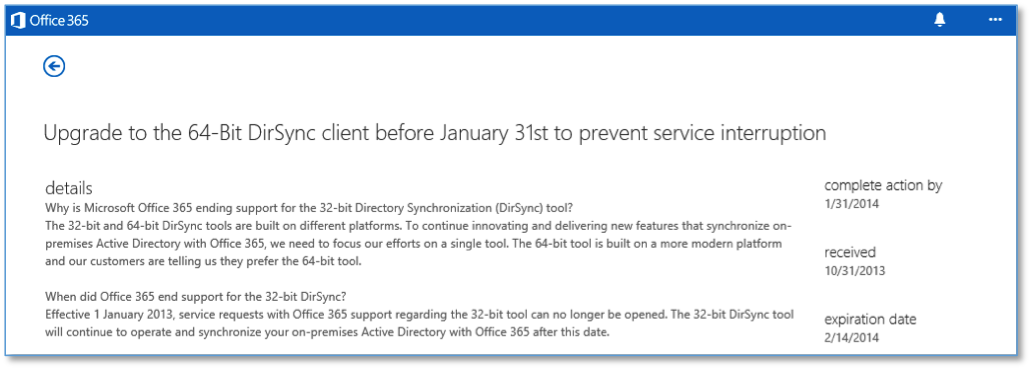
As before, the benefit of these targeted messages is to help us provide you with more specific instructions on how to keep your service up and running based on your specific configuration. For example, we are able to proactively notify customers using the legacy Directory Synchronization client that it will retire on January 31st, 2014 (see example message below). Our hope is that this information will empower you to proactively manage your environment.
We have big plans for Message Center including making urgent messages more visible and providing more detailed information on service updates. We will continue to keep you up to date on the latest capabilities via Message Center. Be sure to check frequently to make sure you don’t miss anything!