(Excel MVP Jan Karel Pieterse, our guest blogger, runs JKP Application Development Services, specializing in developing business solutions using Microsoft Excel/VBA and Access/VBA. )
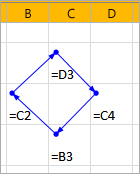 There have been ample articles about troubleshooting unintentional circular references in Excel workbooks. This post focuses on the opposite: choosing to deliberately work with circular references.
Circular references aren’t a bad thing in itself: you can use them to achieve complex calculations that are otherwise impossible to do, but first you must set them up properly.
Circular references can be useful in situations such as the following:
- If you want to perform a calculation for which you need the last result to be a new input value for the calculation. For example, you are creating a calculation model of a chemical facility where (part of) an input stream of a process is a recycled output stream of the same process.
- If you want a cell to remember the date at which an entry was made into another cell.
These are the most important things to consider when you create an Excel workbook with circular references:
- Decide up front whether what you’re trying to calculate actually is of a circular nature. Very often there is a way to rewrite your calculations in such a way that no circular references are needed. The latter is always the preferred method to use.
- If and only if you are convinced you need circular references to accomplish your goal, first meticulously document your model. Make sure you clearly state what your intentions are and how the model functions.
- Devise a way to clearly indicate the circular reference chain(s).
- Design the circles in such a way that you have cells that can be used to temporarily break the circular reference chain.
- Make sure you can give your circular chain a starting value, possibly using the breaker cells mentioned above.
- Check for model convergence: does your model produce stable results during the subsequent iterations?
If this high-level post has triggered your interest in circular references, let me invite you to head over to the article I posted on my website: Working with Circular references in Excel. In it I discuss the elements of using circular references in much more detail.
Regards,
Jan Karel Pieterse
http://www.jkp-ads.com