
In contact centers, a voice conversation does not end when the call disconnects. That’s when critical work begins – logging outcomes, updating systems, triggering workflows, and ensuring compliance. Yet today, post-call actions are often delayed, inconsistent, or dependent on manual or external processes.
With caller hang-up event support in Dynamics 365 Contact Center and Copilot Studio, we are changing that.
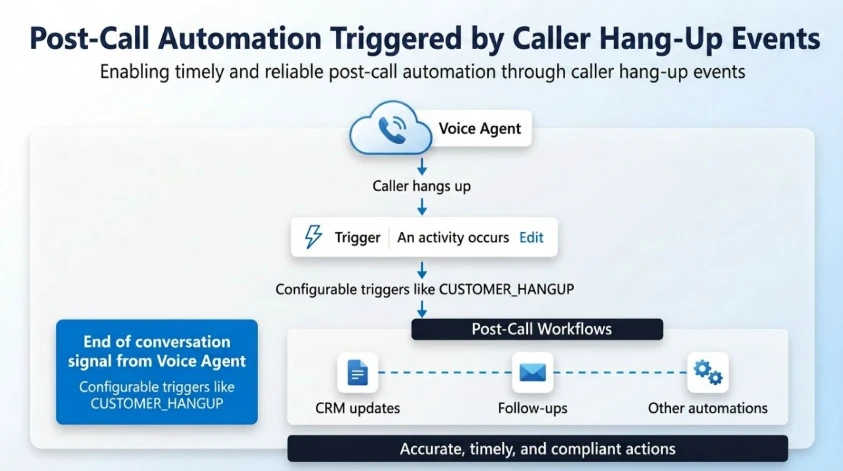
This capability enables real-time, event-driven post-call automation by raising precise caller hang-up events to voice agents. Post-call actions happen immediately, reliably, and at scale.
Why this matters
Post-call actions today often require custom implementations and are not always easy to configure or consistently reliable.
Organizations frequently depend on external orchestration or complex workflows, which can leave gaps, especially when a caller disconnects unexpectedly in the middle of a flow.
For example, when a caller hangs up mid-flow, records can remain locked or reflect stale or incomplete data in downstream systems.
As a result, organizations face:
- Missed or delayed post-call actions
- Inconsistent or stale data updates
- Gaps in reporting and operational workflows
This creates friction across automation and downstream operations.
What’s new
Voice agents can now listen to end-of-conversation events and take action based on how the call ended – directly within their Copilot Studio flow.
For example, you can trigger workflows specifically when:
- The customer hangs up
- The call is transferred to an external phone number
- The call is escalated to customer service representatives in Dynamics 365 Contact Center
This capability is exposed through activity-based triggers in Copilot Studio, enabling makers to configure post-call logic within their voice agent flow in Copilot Studio.
How it works
At the end of every conversation, the platform emits a structured event:
- Activity type: End of conversation
- Context: Conversation.EndReason (for example, CUSTOMER_HANGUP)
Makers can configure triggers such as:
- When activity = End of conversation
- AND EndReason = CUSTOMER_HANGUP
- Execute post-call workflow
This creates a deterministic and reliable event model for post-call automation.
Key benefits
- Immediate and reliable execution: Post-call workflows trigger as soon as the caller disconnects, eliminating delays and missed actions.
- Foundation for governance and insights: Accurate call termination signals enable organizations to implement compliance, auditing, and data policies while building custom telemetry, reporting, and customer experience insights.
Real-world scenarios
- Automated record updates and follow-ups: Update or unlock CRM records and trigger SMS, email, or callback workflows immediately after the customer disconnects, ensuring the latest state is captured and acted on without delay.
- Drop-off detection and recovery: Identify when customers exit during critical flows (such as payment or authentication) and initiate appropriate recovery or risk handling actions.
- Operational insights and optimization: Leverage precise end-of-conversation signals to improve data accuracy, escalation tracking, and overall customer experience.
Learn more
To learn more about post-call actions, read the documentation: Configure post-call action topics – Microsoft Copilot Studio | Microsoft Learn