We are excited to announce the availability of a highly requested feature: Refresh Database Self-Service. This is available using the Maintain > Move database menu option in your sandbox environments.
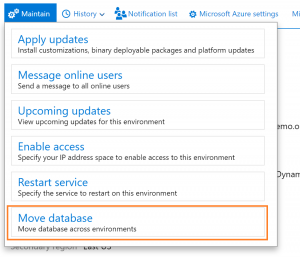
This has been made available as a self-service action that allows you to copy a database from Production (or another sandbox) in to a target sandbox without needing to create a Service request. To learn more about Database refreshes, see the latest updates in Request sandbox database refreshes.
Important considerations
- We will continue to take Service requests for “Database refresh” through January 2019. Any requests after that will be rejected by our Service Engineering team.
- Before we start rejecting these requests, we will provide a means for customers and partners to schedule this operation off-hours or with recurrence.
- This does not impact Sandbox to Production service requests for Go-Live scenarios.
- Existing requests that are for dates after January 2019 will be rejected.
- Sandbox environments are not supported for Production Reporting scenarios. Customers who want to report daily on production transactions should review the BYODB functionality, which is fully supported.
- In case of failure, the option to perform a Rollback is available. By clicking the rollback option after the operation has initially failed, your target sandbox environment will be restored to the state it was before the refresh began. This is often required if a customization is present in the target sandbox that cannot complete a database synchronization with the newly refreshed data. To determine the root cause of the failure, download the runbook logs using the available buttons before starting the rollback operation.
- If needed, contact Support for assistance with your environment’s ActivityID.