Azure Active Directory authentication for SQL Server 2022
Part of the SQL Server 2022 blog series.
Azure Active Directory (Azure AD) authentication is now supported for SQL Server 2022 preview on-premises for Windows and Linux Operating Systems.
Azure AD Authentication methods
The new functionality extends existing authentication modes, such as SQL authentication and Windows authentication, allowing users to connect to SQL Server 2022 using the following Azure AD authentication methods:
- Azure Active Directory Password
- Azure Active Directory Integrated
- Azure Active Directory Universal with Multi-Factor Authentication
- Azure Active Directory access token
For more details, see Azure Active Directory (Azure AD) authentication for SQL Server overview.
The new authentication mode using Azure AD is based on the central authentication repository provided for Azure cloud. This functionality is already supported for Azure SQL Database, Azure SQL Managed Instance, and Azure Synapse Analytics.
Enable Azure AD authentication in SQL Server 2022
The diagram below presents two stages required for a SQL Server 2022 instance to support Azure AD authentication:
- Azure AD setup
- Azure AD user authentication
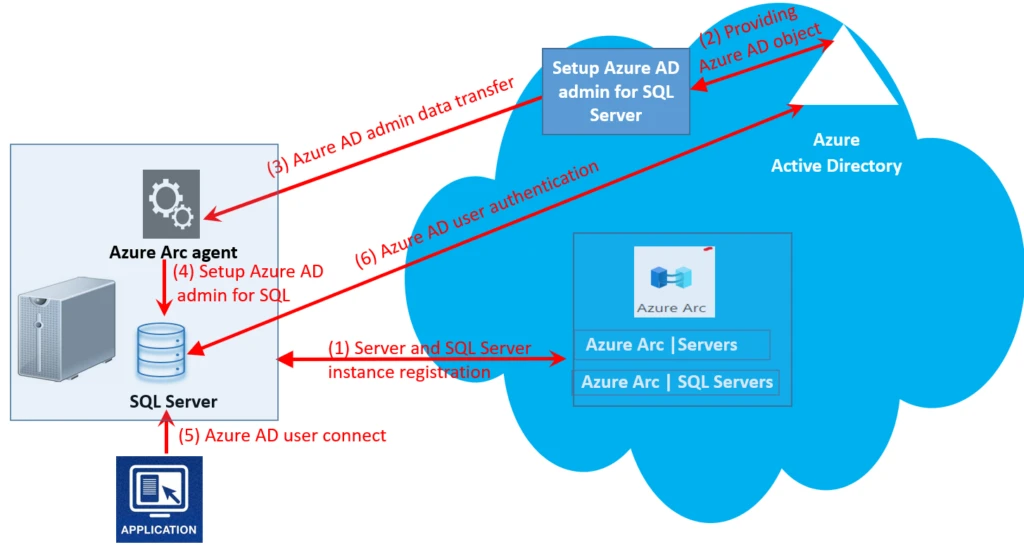
Steps for Azure AD setup based on the diagram above:
- Using Azure Arc in the Azure portal, register a host server (an on-premises Windows or Linux server) with a SQL Server 2022 instance installed on this server. This registration creates an Azure Arc agent on the host server, and you will have a new SQL Server – Azure Arc resource.
- In your SQL Server – Azure Arc resource, go to the Azure Active Directory setting to set up an Azure AD administrator for the SQL Server instance.
- This setup triggers the Azure AD administrator data transfer to Azure Arc agent.
- The Azure Arc agent transfers this information to the SQL Server instance.
For more details on the Azure AD setup, see set up Azure Active Directory authentication for SQL Server.
Steps for Azure AD user authentication based on the diagram above:
- Using an application—for example, SQL Server Management Studio (SSMS) version 18.0 or higher—to connect to the SQL Server instance with the Azure AD admin credentials set up for the SQL Server instance (see the snapshots below).
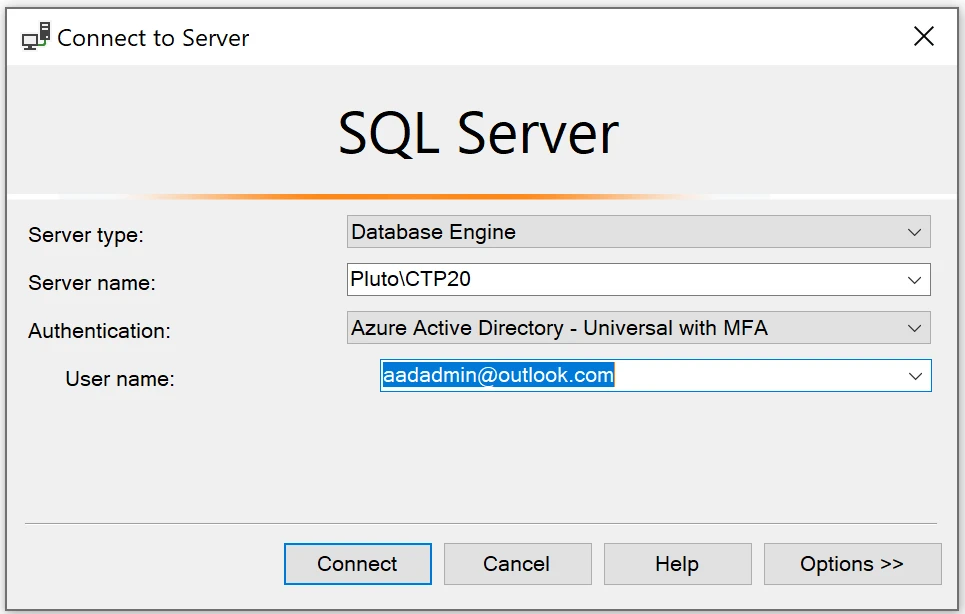
In the Options>> tab, check the boxes for Encrypt Connection and Trust server certificate.
If you are using the Azure AD admin, the database connection to <default> (master database) or any other user database is allowed. For other Azure AD users, a connection to a specific user database may be required as they will need permission to connect to that database.
- After being authenticated as an Azure AD admin, database operations can be executed.
Once the Azure AD admin is connected to the SQL Server instance, the account can create other Azure AD logins and users, and grant them necessary database permissions. For more details see, Set up Azure Active Directory authentication for SQL Server.
SQL Server 2022 also supports linked servers that can be configured using Azure AD with two authentication mechanisms, by providing credentials for Password or Access token. For more information see Linked server for SQL Server with Azure Active Director authentication.
Benefits of using Azure AD authentication
Enabling Azure AD authentication opens access to the Azure cloud identity system. Azure AD is used by many cloud services and unifies all local authentication mechanisms used by Microsoft products providing one central identity repository and authentication management system available to different platforms, including Azure SQL and SQL Server on-premises. The variety of available authentication methods including single sign-on (SSO) and multifactor authentication (MFA), provides strong security support in the authentication area for different services used internally by Microsoft and by external customers. Azure AD authentication is the recommended authentication method for Azure SQL and SQL Server.
Availability
Not all Azure AD authentication functionality available for Azure SQL is supported in the current version of Azure AD authentication for SQL Server 2022. That includes Azure AD-only authentication, as well as User and System Assigned Managed Identity (UMI and SMI), which are not supported for the SQL Server 2022 release. In addition, Azure AD authentication is not part of the main SQL Server 2022 setup and must be enabled later as a separate step after SQL Server is installed.
Next steps
Download the SQL Server 2022 Preview trial version if you haven’t already done so, and set up Azure AD authentication for your SQL Server instance. Share your experiences with us and let us know your comments.
Azure Active Directory resources
For more information and to get started, check out the following links:
- Connect SQL Server to Azure Arc.
- Azure Active Directory (Azure AD) authentication for SQL Server overview.
- Set up Azure Active Directory authentication for SQL Server.
- Linked server for SQL Server with Azure Active Director authentication.
Learn more
- Intelligent Data Platform: read how you can innovate faster and achieve greater agility with the Microsoft Intelligent Data Platform and turn your data into decisions.
- Download: get started today by downloading the preview or deploying in Azure! To install SQL Server 2022 in preview on Linux, see installation guidance.
- Documentation and Training: learn more about the features of SQL Server 2022 by reading the documentation and watching the SQL Server 2022 Data Exposed video series.
- Feedback: let us know if you have any thoughts or feedback through our SQL Server feedback portal. We look forward to seeing how SQL Server 2022 will transform your business in the future.