Summary Welcome to the Power Platform monthly feature update! We will use this blog to share news in Power Platform from the last month, so you can find a summary of product, community, and learning updates from Power Platform in one easy place. Now, let’s dive into what’s new in Power Platform:
Get started with the latest updates today!
Jump into Power Apps, Power Automate, and Power Pages to try the latest updates, you can use an existing environment or get started for free using the Developer plan.
Power Apps
Generally available: custom theming for model-driven apps
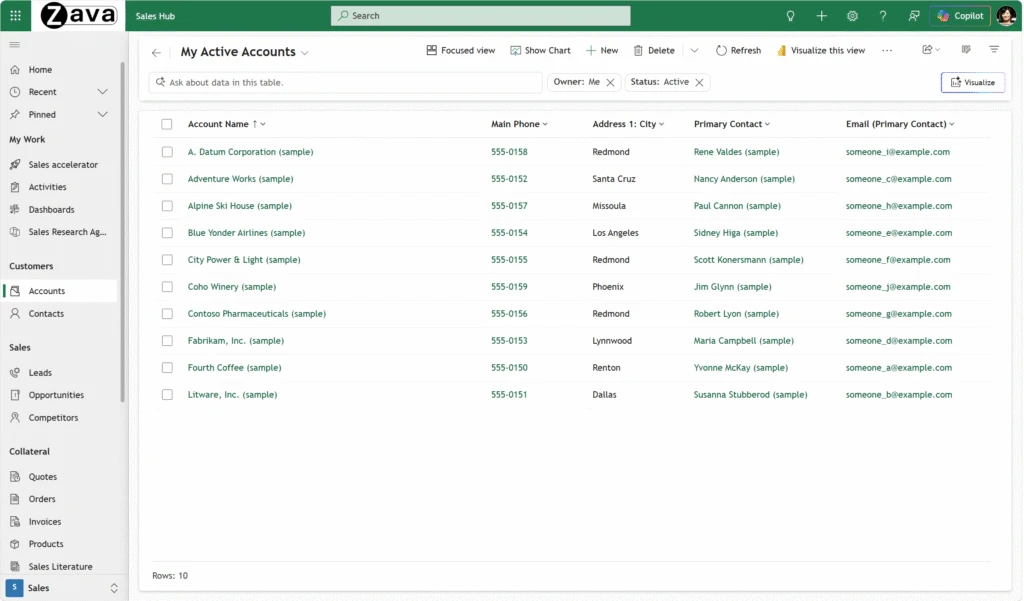
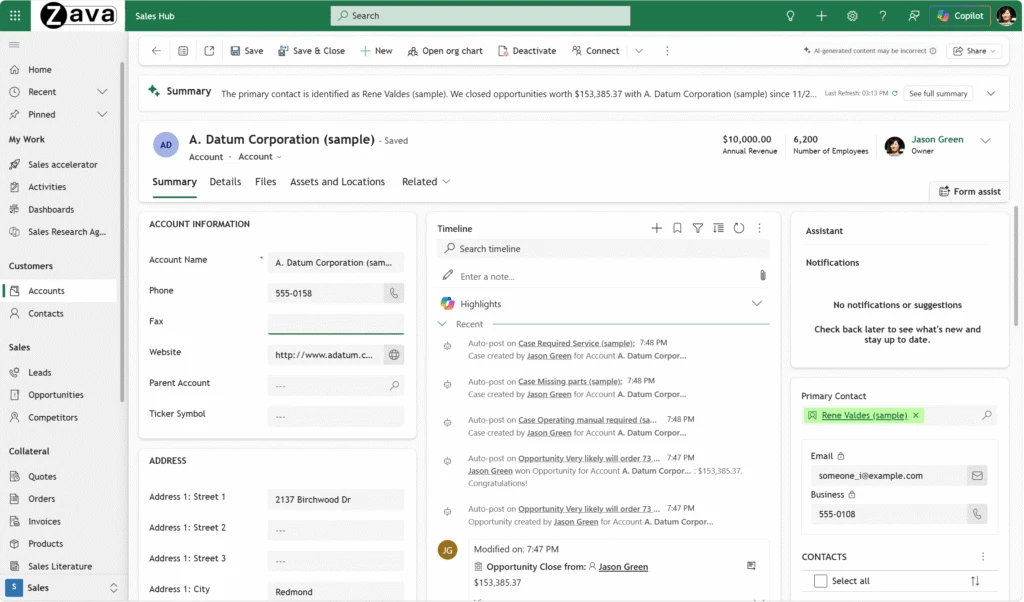
Custom theming for model-driven apps using the modern, refreshed look is now generally available. This capability lets organizations align their model-driven apps with company branding by customizing colors, fonts, and app header styling using the Microsoft Fluent 2 design system.
With modern themes, makers can apply a cohesive color scheme across the app from a single base color — covering hyperlinks, primary buttons, active tab indicators, row selection, and hover effects. You can also customize the app header background and text colors, set a custom logo, and override the default font used throughout the application. These customizations are applied through an XML web resource and scoped to your environment via the Custom theme definition app setting.
If your organization was using classic themes, now is the time to create a new custom theme XML web resource that reflects your branding and apply it to your environment. Note that classic theming is not honored with the modern look, which is becoming mandatory for model-driven apps in April 2026.
Public preview: your business apps, now part of every conversation
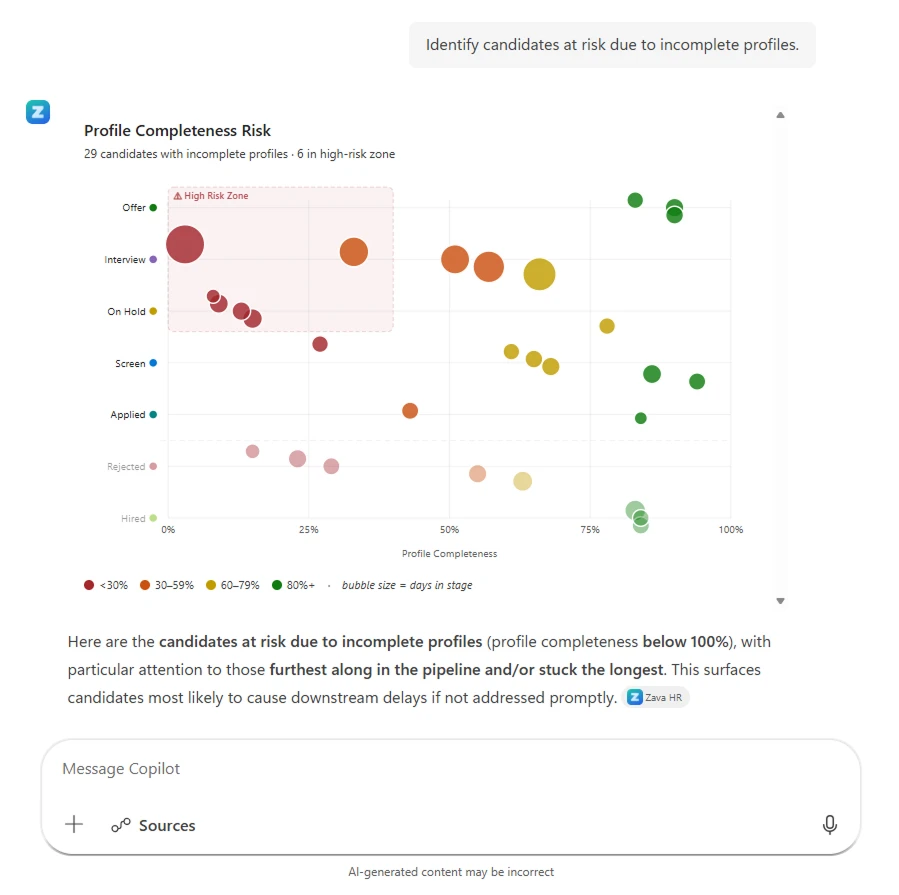
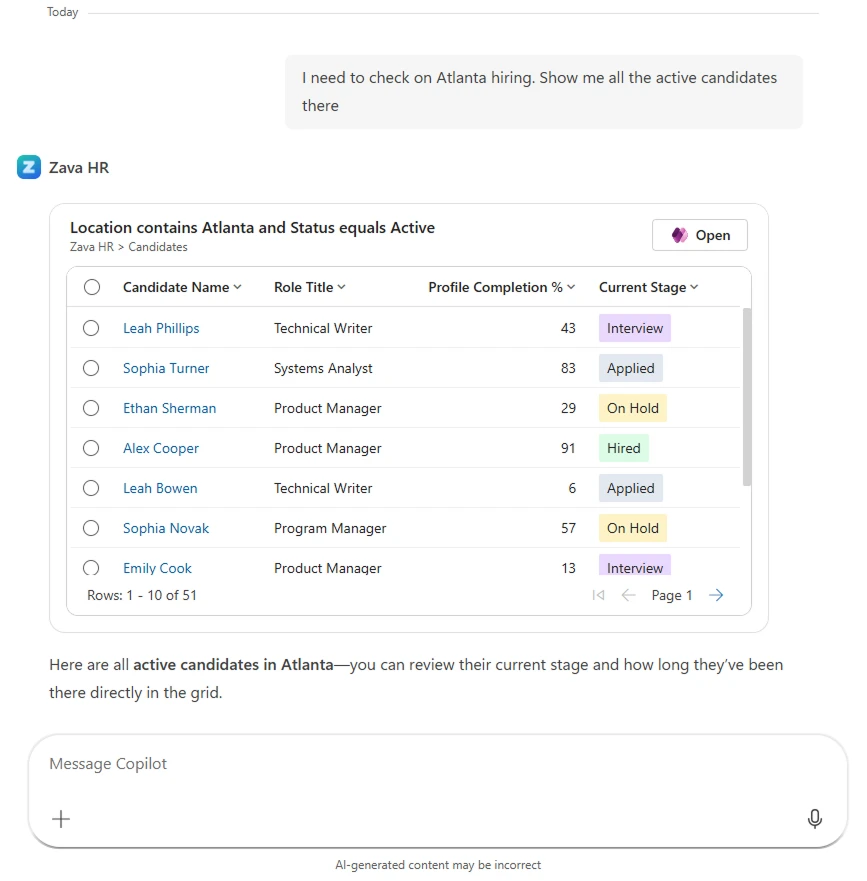
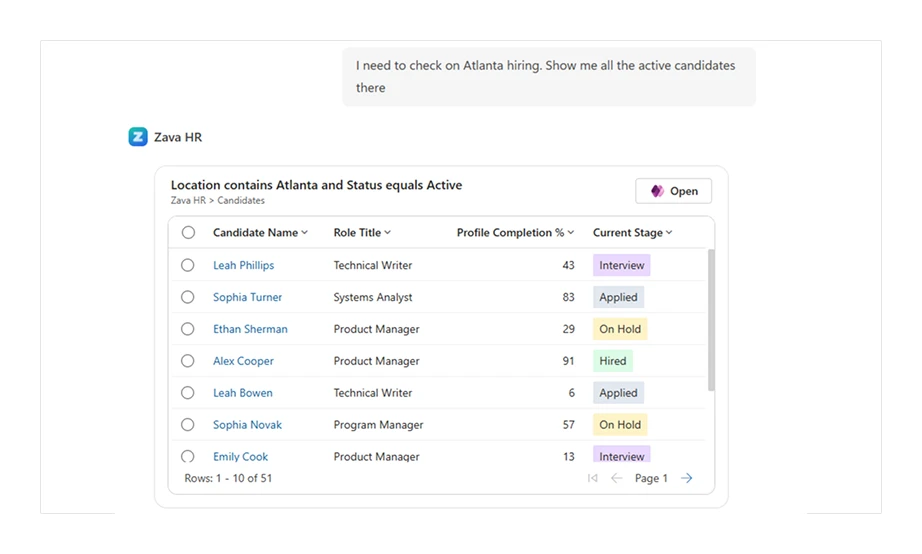
Today, we’re taking the first step to bring your Power Apps data and experiences directly into Microsoft 365 Copilot—so key parts of your model‑driven apps can show up right where your users already work, powered by your app’s MCP server.
Public preview: FetchXML editor for offline profiles in Power Apps mobile
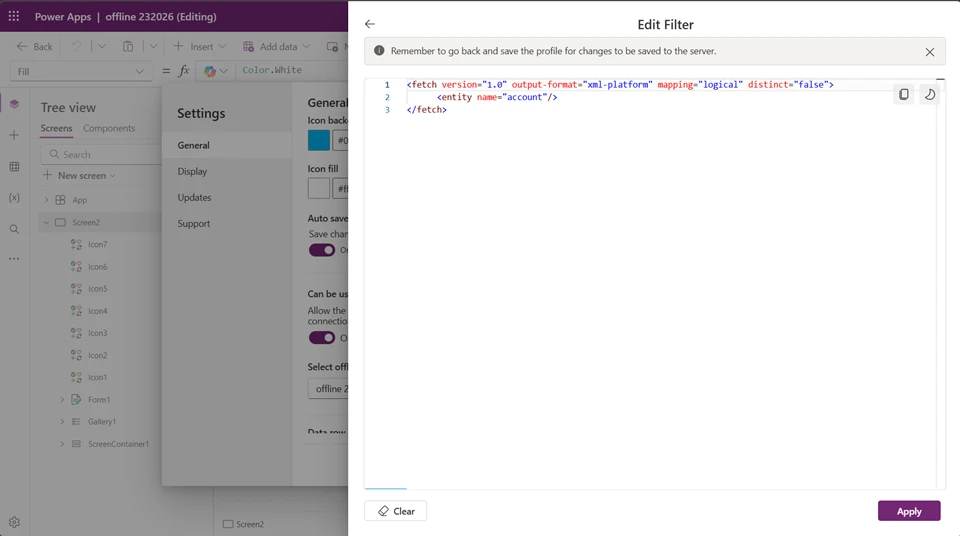
This March, we’re excited to announce the FetchXML editor for Power Apps offline profiles in public preview. For canvas and model-driven apps that work offline, configuring an optimal fetch XML solves the majority of the performance problems.
The FetchXML editor gives advanced makers and pro developers a code-level entry point directly inside the offline profile experience to optimize their profiles better and more effective than before. Write or paste a FetchXML query to define the custom filters on a table or related tables. Leverage key performance features like support for unrelated tables, latematerialize=”true” and SQL query hints. These capabilities help optimize how Dataverse executes the sync — reducing query complexity and avoiding timeouts on large tables.
To try it, open an offline profile in Power Apps studio, select “Edit filter” on any table or related table, and choose “View/Edit FetchXML.”
Double-click to edit the Text control inline in canvas apps
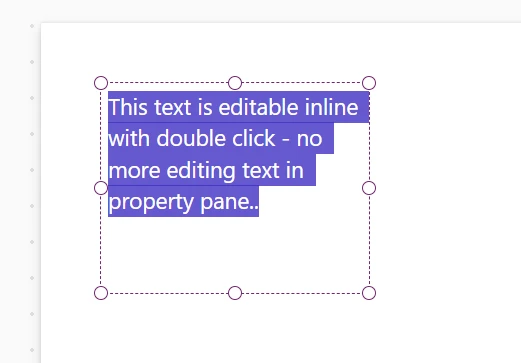
You can now double-click the modern Text control directly on the canvas to edit its text inline — no need to navigate to the formula bar or properties panel. This makes it faster to update labels, headings, and static text while building your app. This improvement streamlines the authoring experience and brings the Text control in line with the familiar editing behavior makers expect from modern canvas controls.
AI-powered development
Public preview: build canvas apps with AI coding agents
With the Canvas Apps MCP Authoring Plugin, makers can now use their preferred AI coding agents — such as GitHub Copilot, Claude Code, or any MCP-compatible assistant — to build and modify canvas apps through natural conversation.
The Canvas Authoring MCP Server runs locally alongside your development environment and connects to a live Power Apps Studio coauthoring session. You can describe a screen or an entire app in plain language, and your coding agent translates that into structured, validated YAML. Agents can use the plugin’s tools to discover available controls and their properties, explore data sources and connectors, and generate a working app. YAML and Power Fx errors are identified and resolved by the coding agent before any changes appear in Studio, so you stay in flow. Because every interaction is grounded in your live authoring session, the output remains accurate, governed, and adheres to Power Apps’ platform constraints.
Generally available: external tool support for generative pages is now available in all public clouds worldwide
Building generative pages using external AI coding tools like GitHub Copilot CLI is now generally available. You can build rich, custom user experiences directly within your model-driven apps using your preferred AI codegen tool, and publish them as first-class Power Apps experiences. To get started, connect to your environment using PAC CLI and use the tool to generate a page.
Generative pages via external tools is also now available in all public clouds worldwide, the most-requested milestone since the feature launched in preview. No matter where your organization operates, you can now extend your model-driven apps with AI-built pages.
Pages are also localized out of the box. When an agent generates a page, it automatically adapts to the user’s language and regional formatting preferences including dates, numbers, and text. This localization guidance is built directly into the external tool plugins, so you get correctly localized output wherever you’re building.
Managed platform
Alerting and data metrics now available for code apps in Power Platform monitor
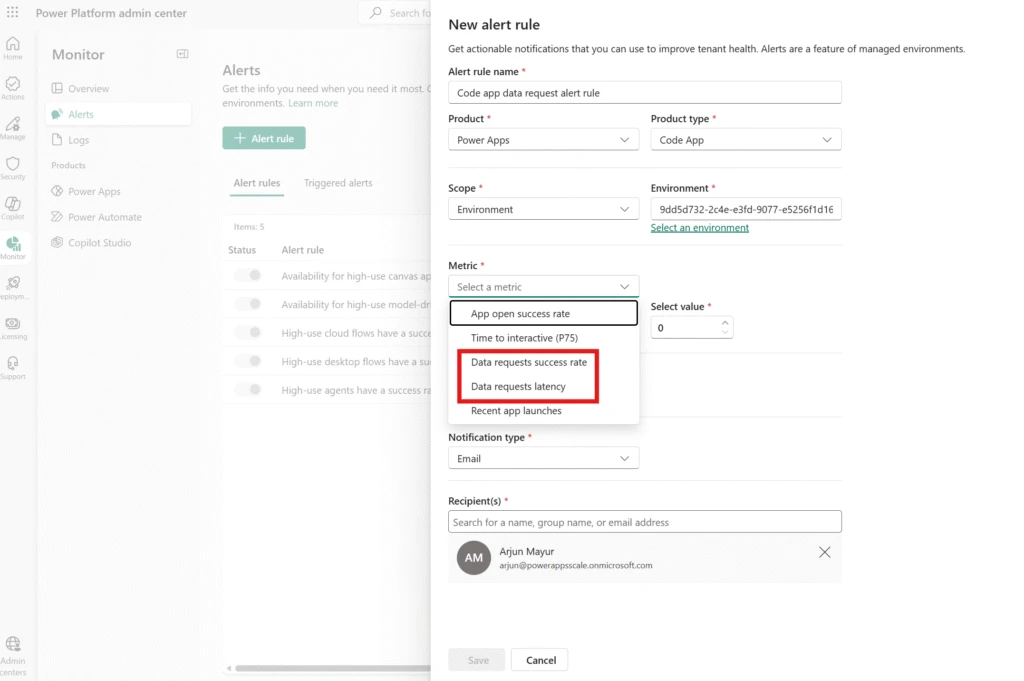
We’re rolling out new alerting capabilities and metrics for code apps in Power Platform monitor, extending enterprise-grade observability to next-generation applications. Code apps allow developers to build using the tools and workflows they already know, then bring those apps into Power Platform to benefit from enterprise governance, security, and monitoring. With code app alerts, IT and Operations teams can now monitor these developer-built applications with the same confidence and control they have for canvas and model-driven apps, giving these teams the visibility they need to scale code app adoption across the enterprise without sacrificing reliability.
Admins can now create alerts on code apps for the following metrics: app open success rate, time to interactive, and recent app sessions. Additionally, we’ve added two new data metrics for code apps that can also be configured for alerts: data request success rate and data request latency. These alerts provide end-to-end visibility from app launch to data access, helping teams catch performance regressions before the majority of users are impacted and respond faster to reliability issues in production. Available now in Power Platform monitor with no setup required, code app alerts enable IT and operations teams to define health thresholds, receive proactive notifications, and take guided action. This enables them to move from reactive troubleshooting to proactive operations for both low-code and pro-dev applications within a unified monitoring experience.
These changes will be available in all public regions by May 1, 2026.
Learning updates
Training paths and labs
Updated training
- Create reports with Power BI and Dataverse for Teams – Training
- Get started with Microsoft Dataverse for Teams – Training
- Use imperative development techniques for canvas apps in Power Apps – Training
- Get started with model-driven apps in Power Apps – Training
- Use Dataverse choice columns with formulas – Training
- Integrate a Power Apps app with Power Automate – Online Workshop – Training
Power Apps maker
New
- Add Microsoft 365 Copilot for app users in model-driven apps (preview)
- What is Dataverse intelligence?
- Business skills overview
- Create and use business skills
- FAQ for Power Apps vibe experience (preview)
Updated
- Connect to Dataverse with model context protocol FAQ
- Add agents to your model-driven app (preview)
- Prompt columns (preview)
- Get started with Power Apps
- Build apps through conversation with Copilot
- Create a canvas app using Microsoft Dataverse
- Create a canvas app with data from a list
- Create a canvas app based on Excel data
- Create a blank canvas app from scratch
- Complete guide to building canvas applications
- Use plans to create a business solution with Copilot
- Attachments control in Power Apps
- Filter, Search, and LookUp functions
- Use modern themes in Power Apps
Power Automate
New
Updated
- Configure actions and the actions pane
- AI Builder actions reference
- Browser automation actions reference
- Troubleshooter
- Process capacity
- Limits of automated, scheduled, and instant flows
- Prerequisites and limitations
- Integrate Power Automate with websites and apps
- Troubleshoot a cloud flow
- Use flows with Excel
- Use SharePoint and Power Automate to build workflows
- Create flows in Microsoft Teams
- Run desktop flow actions reference
- Handle errors in desktop flows
- Drafts and versioning for solution-aware cloud flows
- Configure Power Automate for desktop proxy settings
- Hosted machines
- Compression actions reference
- Data loss prevention (DLP) policy creation
- Explore Power Automate’s automation center
- Configure desktop flow logs behavior
Power Platform administration
New
- Copilot Studio agents inventory schema
- Power Platform inventory schema reference
- Manage support requests
Updated
- Limit sharing
- PowerShell support for Power Apps and Power Automate
- Virtual Network support white paper
- Identity and access management
- Opt in to early access updates
- Role-based access control for Power Platform admin center (preview)
- Pay-as-you-go meters
- View known issues
- Move data across regions for Copilots, AI agents, and generative AI features
- Programmability and Extensibility – Authentication
- Programmability and extensibility
- Tutorial: Assign roles to service principals (preview)
- Programmability and extensibility – What’s new or changed
- Continuous access evaluation (preview)
- Create alerts for your resources (preview)
- Restore deleted Microsoft Dataverse table records (preview)
- Create and manage environments in the Power Platform admin center
- Manage Copilot Studio credits and capacity
- Commonly used Microsoft first-party services and portal apps
- Dataverse capacity-based storage details
- Power Platform inventory
- Get Support in Power Platform
- Overview of unified admin experience for finance and operations apps
- Tutorial: Schedule environment copy and automated data import using Azure DevOps
- Metrics and recommendations for Power Automate
- Elastic compute for finance and operations apps
- Tutorial: Set up a nightly build pipeline for finance and operations apps using Azure DevOps
- Tutorial: Set up a release pipeline for finance and operations apps using Azure DevOps
- Configure Dataverse search for your environment
- Free up storage space
- Manage your customer-managed encryption key
- Securely access customer data using Customer Lockbox in Power Platform and Dynamics 365
- Manage Dataverse auditing
- Delete bulk records
- Power Platform inventory API
- Policies and communications for Power Platform and Dynamics 365 Services
- Copilot Studio agents inventory schema
- Power Platform inventory schema reference
Power Platform developer
New
- Dsr Compliance APIs
- Querying data (preview)
- Connect and disconnect Dataverse from a Git repository by using code
- Tutorial: Use OIDC/FIC authentication with GitHub Actions for Microsoft Power Platform
Updated
- Build and package plug-in code
- Create a bot with the Bot Framework SDK What’s new for the Bot Framework SDKs
- What is the Bot Framework SDK?
- Continuous integration and deployment
- Microsoft Dataverse SDK for Python package reference
- Dataverse SDK API Reference
Power Apps user and mobile
New
Updated
- Modern, refreshed look for model-driven apps – Power Apps
- Find data in a view with AI (preview) – Power Apps
- Use Copilot’s form fill assistance feature in model-driven apps – Power Apps
- Add or edit Power BI visualizations on your dashboard – Power Apps
- Use Microsoft 365 Copilot in model-driven apps (preview) – Power Apps
- AI features overview – Power Apps
- Use Copilot chat in model-driven apps – Power Apps
- Configure files and images in offline canvas apps – Power Apps
Power Pages
New
Updated
- Create a Custom Chat Interface
- Power Pages Client APIs Overview (preview)
- Configure Microsoft Entra ID Authentication for Power Pages Agent
- Configure user authentication for an agent
- Add an agent from the setup workspace
- Get started with the Power Pages plugin for GitHub Copilot CLI and Claude Code (preview)
- Important upcoming changes and deprecations in Power Pages
- Configure non-production Power Pages site visibility
- Site visibility in Power Pages
- Manage your site’s Content Security Policy
- Advanced Settings (preview)
- Access user and website details with server objects
- Power Pages server logic overview
- Power Pages search with generative AI
- Data summarization API overview (preview)
- Add a custom domain name
- Frequently Asked Questions template
- Create new sites with Bootstrap version 5
- Enhanced data model
- Migrate standard data model sites to enhanced data model (preview)