Updated: March 23, 2016 by James Wang [MSFT]
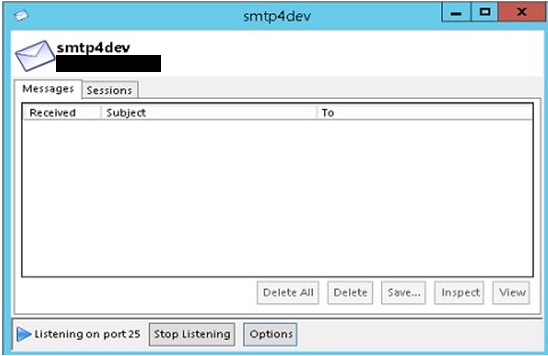
The SMTP4Dev tool is easy-to-use and utilized to isolate issues related to e-mailing from Microsoft Dynamics AX as well as other software that generates email. This tool is useful in isolating issues with message hand-off or SMTP connection without having to send actual emails.
This tool may be installed on the existing SMTP server or another server local to Microsoft Dynamics AX. If the tool is installed on a server with an existing SMTP service, the SMTP service will need to be stopped if listening in on port 25 to avoid port conflicts. There is an option to change the port in the SMTP4Dev tool, but do not forget to change the port setting in the E-mail parameters form in Microsoft Dynamics AX.
Walk-through:
- Download and run the tool on the desired server
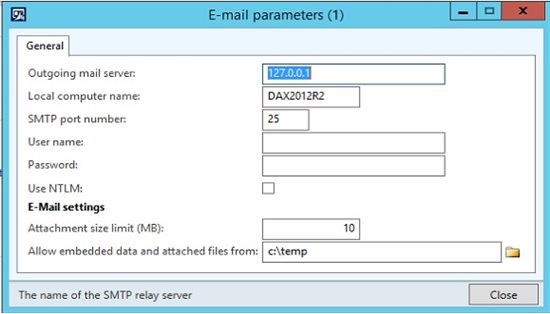
- In Microsoft Dynamics AX, navigate to: System Administration > Setup > System > E-mail parameters.
- Enter the settings to point to the outgoing server via name or IP where SMTP4Dev is running
- Specify the machine name as the Local computer name which will likely be the AOS
- Specify the SMTP port which is port 25 by default
- Run this sample X++ code as a job in the AOT
static void email_test(Args _args)
{    SysMailer   sysMailer = new SysMailer();
;
sysMailer.quickSend("from@test.com","to@test.com","test Alert mail","test Alert
mail");
Info("Success");
}
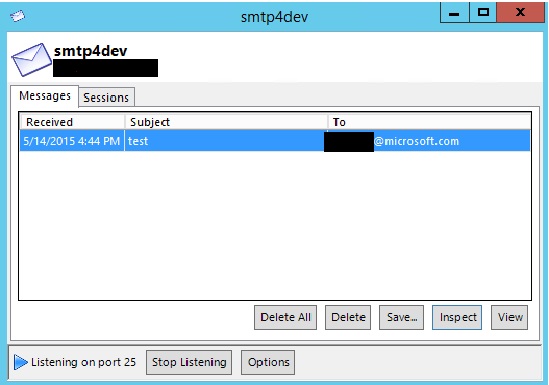
- Go to your smtp4dev tool and verify that the e-mail was received.
Common Issue 1:
Error: Method ‘send’ in COM object of class ‘CDO.Message’ returned error code 0x8004020E (<unknown>) which means: <unknown>.
Cause: This error occurs when Microsoft Dynamics AX is unable to authenticate to the SMTP service.
Common Issue 2:
Error: Method ‘send’ in COM object of class ‘CDO.Message’ returned error code 0x80040213 (<unknown>) which means: The transport failed to connect to the server.
Cause: This error occurs when Microsoft Dynamics AX is unable to connect to the SMTP service due to mismatch in port, relay restrictions, or network (firewall) configuration.
And finally, to ensure email functionality in Microsoft Dynamics AX please refer to these knowledge base articles which are available in LCS:
| KB Number | Title | Build Number | |
| 3085836 | Email Sent using SysMailerNet quickSend with multiple Addresses in CC line fails | 6.3.2000.3722 | |
| 3073716 | Sales invoice Updates in Batch – information accumulates in batch job parameters | 6.2.2000.923 | 6.3.2000.3924 |
| 3071892 | Packing slip not sent via email when using print management and processed in batch | 6.3.2000.3084 | |
| 3029183 | Batch Completion Alert email notifications silently fail due to new email architecture (System.Net.Mail) | 6.3.1000.1163 | |
| 2979944 | Email sent using SysMailerNet quickSend with an attachment and empty CC will silently fail to send email | 6.3.164.1483 | |
| 3120901 | Failed to send invoices to customer from the batch server, caused by randomly missing invoices where a duplicate temp file directory name is created | 6.3.3000.460 | |
| 3138517 | Cannot send invoices to customer from the batch server | 6.2.3000.897 | |
| 3024987 | Terminal Service sessions IDs are part of printer value in SysLastValue | 6.2.1000.9536 | 6.3.164.3621 |
| 3120901 | Fail to send invoices to customer from the batch server, caused by randomly missing invoices where a duplication temp file directory name is created prior to the PDF being generated | 6.2.3000.978 | 6.3.3000.460 |
![Avatar of Chandan R Jha [MSFT]](https://secure.gravatar.com/avatar/bb9c3d004004ce161e20700e8d22bd91534d25e0d2f9456f8408ddd940ba59ed?s=212&d=mm&r=g)