A common time out exception you may experience with NetTcp AIF calls in AX is:
The socket connection was aborted. This could be caused by an error processing your message or a receive timeout being exceeded by the remote host, or an underlying network resource issue. Local socket timeout was ’01:09:59.9770000′.
This error can be deceptive as it doesn’t relate to actual timeout values but instead to the size of the ObjectGraph coming across through WCF. The workaround for this issue is to either break up your packages by sending multiple smaller requests, recommended, or by increasing the size of the MaxItemsInObjectGraph behavior parameter. Below are steps for increasing the object graph size for an AIF Inbound port service.
- Open the AX client
- Open the System Administration > Setup > Services and Application Integration Framework > Inbound Ports window
- Deactivate your service
- Click on the Configure button next to your adapter
- Expand the Advanced folder
- Click the Endpoint Behaviors folder
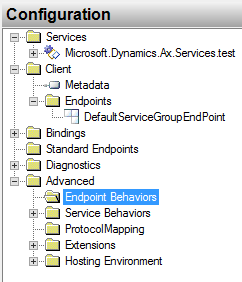
- In the window pan, click New Endpoint Behavior Configuration
- Select the new configuration you just created, and in the window pane, click Add… Select dataContractSerializer and then click Add
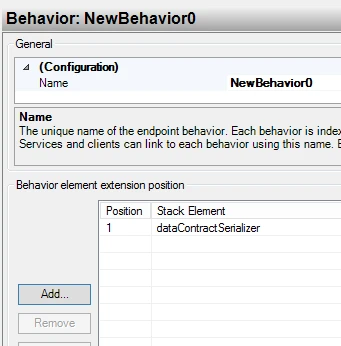
- Double-click the dataContractSerializer you just added, and change MaxItemsInObjectGraph to a larger number
- Back in the Configuration folder tree, and expand Client > Endpoints
- Select the DefaultServiceGroupEndPoint
- In the Client Endpoint form pane, set BehaviorConfiguration to the configuration you created in steps 7-9.
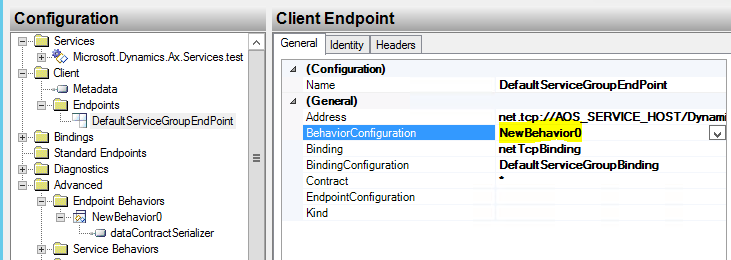
- Close out of the Configure Services window and save those changes
- Activate your service and test again